Reading a crypto trading screen: candles, depth bars and the trades tape
A trading screen shows two things. Trades that have happened become the tape and the candles; orders still waiting become the order book and its depth bars, all streamed live from the exchange.
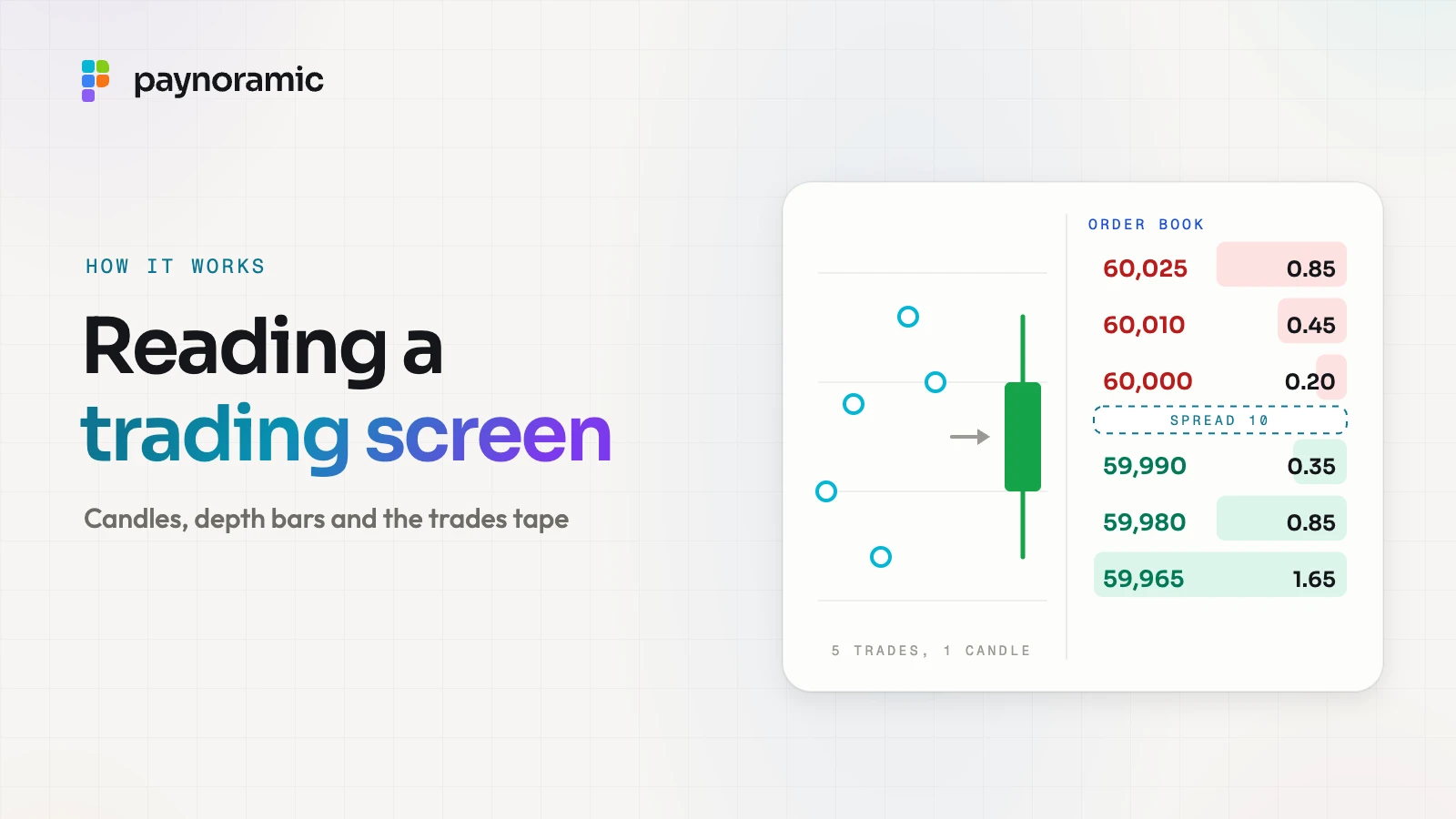
A crypto trading screen looks busy, but it shows only two kinds of data. Trades that have already happened appear one by one on the trades tape and are summed into candles; orders still waiting appear in the order book, with depth bars showing how much sits at each price. Everything on it is computed from the matching engine's output and pushed to the screen as it changes. This guide explains how each part is built, with one worked example, and how the data travels from the exchange to the chart.
Two kinds of data: what has traded and what is waiting
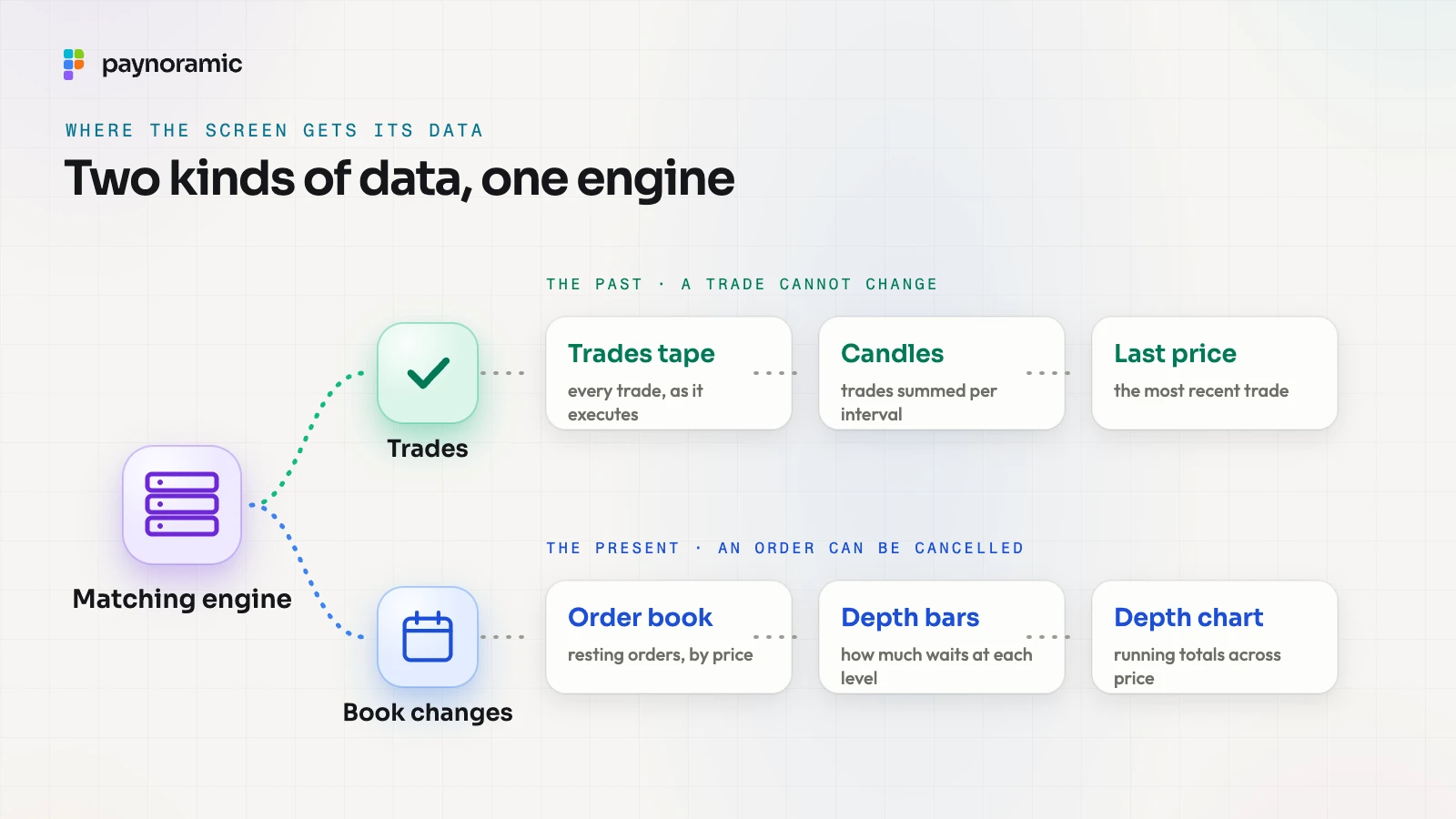
Every number on a trading screen comes from one of two sources.
Trades are the past. Each one is a match between a buyer and a seller at one price, for one size, at one moment. The trades tape lists them; candles summarise them; the last price is simply the most recent one.
Orders are the present. The order book is every resting buy and sell order, sorted by price. Depth bars and the depth chart are two ways of drawing how much is waiting.
The difference matters when reading the screen. A candle is a record of what was paid, and it cannot change once its interval ends; the book is a statement of intentions, and any order in it can be cancelled a millisecond later.
How the book itself works, with bids, asks, the spread and price-time priority, is set out step by step in what happens when you press Buy. This guide picks up from there and looks at how the screen draws it; which parts belong on a beginner's screen and which on a trader's is covered in simple or pro.
How a candle is built from trades
A candle summarises all the trades in one interval, such as one minute, one hour or one day. It needs five numbers, all read straight from those trades:
Open: the price of the first trade in the interval.
High: the highest price traded.
Low: the lowest price traded.
Close: the price of the last trade.
Volume: the sizes of all the trades, added up.
Take a one-minute candle for BTC/USDT from 12:00 to 12:01, with five trades (the numbers are illustrative):
Time | Price (USDT) | Size (BTC) |
|---|---|---|
12:00:04 | 60,000 | 0.10 |
12:00:19 | 60,040 | 0.25 |
12:00:31 | 59,970 | 0.05 |
12:00:48 | 60,080 | 0.20 |
12:00:57 | 60,050 | 0.40 |
The candle opens at 60,000, reaches a high of 60,080 and a low of 59,970, and closes at 60,050, with a volume of 1.00 BTC. The same trades add up to 60,044.50 USDT, which is why a screen can show volume in either asset of the pair.
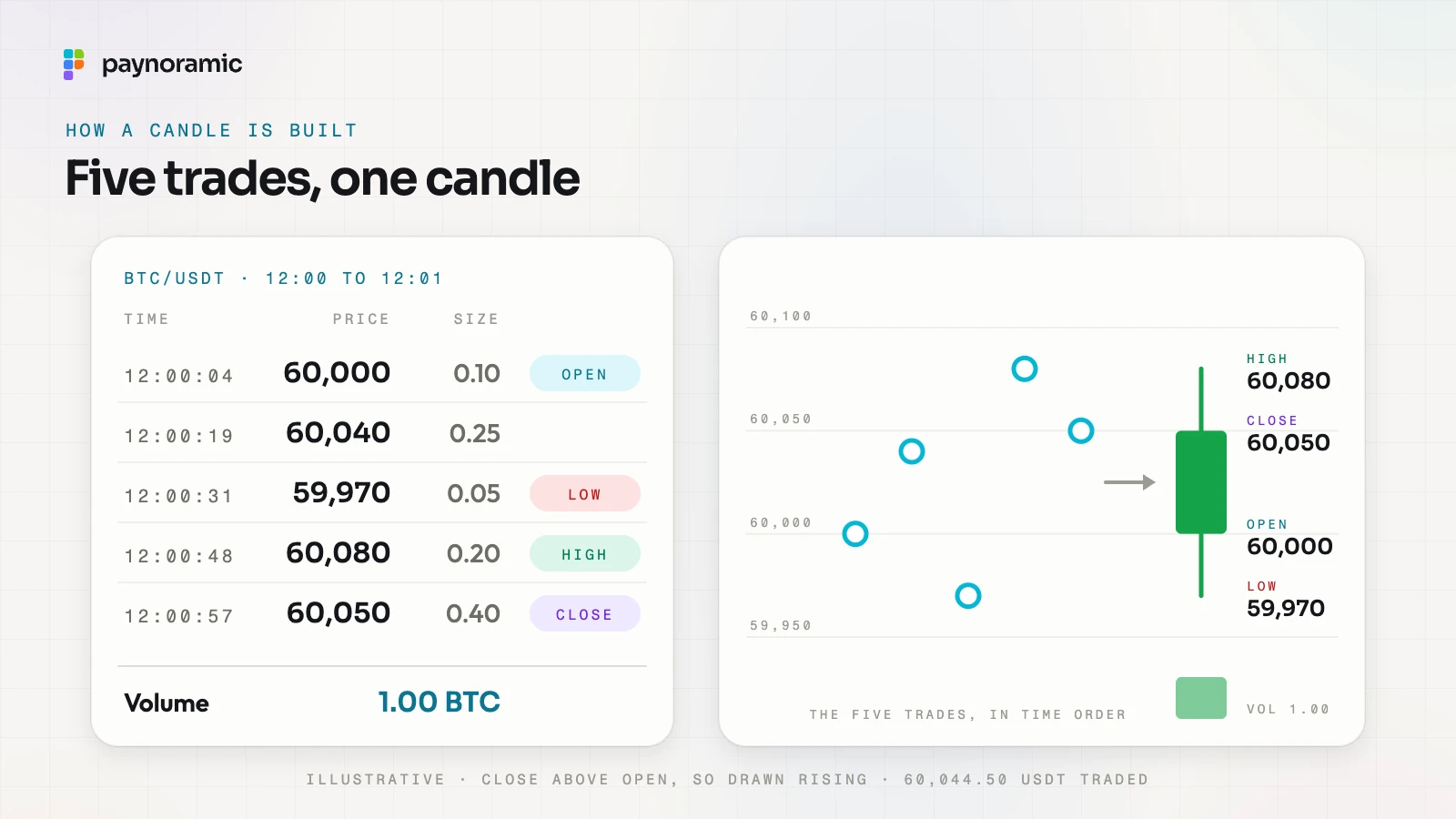
The chart draws it as a body from the open to the close, with thin wicks up to the high and down to the low. The close is above the open, so this candle is drawn as rising, usually in green; a candle that closes below its open is drawn falling, usually in red. A volume bar of the same colour sits under it.
A few details explain what traders see on a live chart:
The last candle is still forming. Until 12:01 every new trade can move its high, low, close and volume, which is why the right-hand candle flickers.
Longer intervals are built from shorter ones. A five-minute candle takes the open of the first minute, the close of the last, the highest high, the lowest low and the sum of the volumes.
An interval with no trades has nothing to summarise. Charts either leave a gap or draw a flat candle at the previous close; it is a display choice, not a market event.
Switching the interval does not change the market. It is the same list of trades, grouped into longer or shorter buckets.
What a moving average adds
A moving average is a line drawn through the candles that smooths out their noise. The simple version takes the closes of the last few candles, adds them up and divides by how many there are.
Seven one-hour closes of 59,900, 60,000, 60,100, 60,050, 60,150, 60,200 and 60,300 add up to 420,700, so the seven-period average is 60,100. When the next hour closes at 60,600, the oldest close (59,900) drops out and the new one comes in, and the average moves to 60,200. That is the "moving" part: a fixed window sliding along the chart.
Screens usually show two or three of them at once, a short one that follows the price closely and a longer one that changes slowly. An exponential moving average works the same way but gives more weight to recent closes. Either way, it is a summary of the past, recalculated on every candle, not a forecast.
The order book and its depth bars
The order book on a trading screen lists each price level with the amount waiting there, and often a running total. Asks sit on one side, from the lowest price up; bids on the other, from the highest down.
Depth bars are the shaded strips behind each row. Each bar's width shows the amount at that level compared with the largest on screen, or the running total from the best price out to that row; exchanges choose one or the other, and many show the running total as its own column.
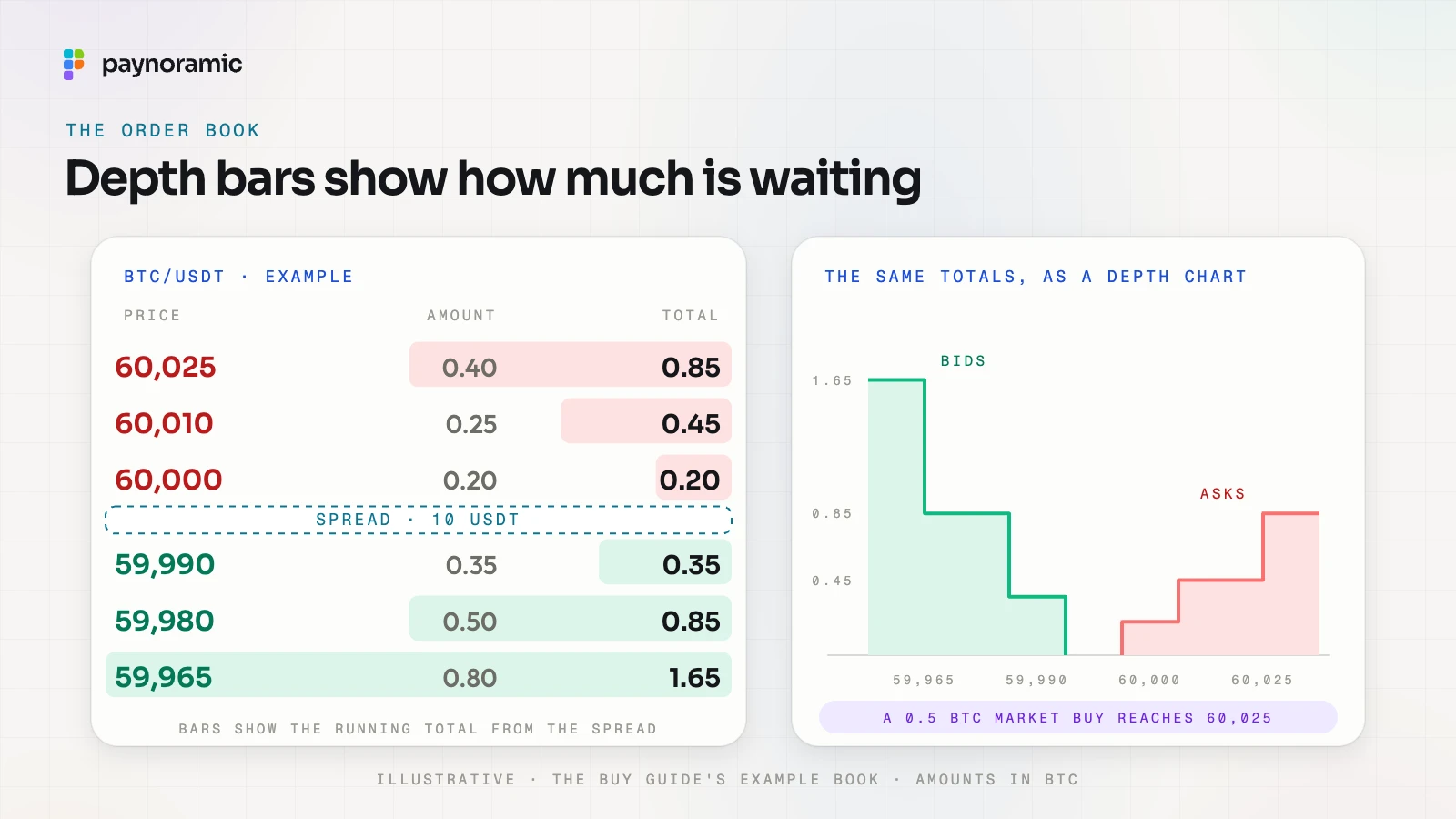
In the example above, the running totals on the ask side are 0.20, 0.45 and 0.85 BTC. They answer a practical question at a glance: how much can be bought before the price reaches a given level. A market buy of 0.5 BTC takes everything at 60,000 and 60,010 (0.45 BTC) and the last 0.05 at 60,025, exactly the slippage the Buy guide works through.
Two more controls change how the book is drawn, not what is in it:
Grouping merges nearby prices into wider levels, such as every 10 USDT instead of every cent, and adds up their amounts. It makes a deep book readable on a small screen.
The depth chart draws the same running totals as two stepped areas, bids rising to the left of the spread and asks to the right, so large orders show as steep walls.
Depth near the spread is a rough measure of liquidity: a thick book means a large order moves the price little. It is still a picture of intentions, so traders read it alongside what actually trades.
You can see this in Marengo, our exchange: its Pro mode has candles with intervals and indicators, a depth chart, the order book with grouping and depth bars, and the trades tape.
The trades tape
The trades tape, also called recent trades, lists every trade as it executes: the time, the price and the size. Each trade is usually coloured by the side that started it, the taker: green when a buyer took an ask, red when a seller hit a bid. Who is maker and who is taker is explained in market maker and taker.
One order can print several lines. The market buy of 0.5 BTC from the example prints three trades: 0.20 at 60,000, 0.25 at 60,010 and 0.05 at 60,025, all green.
The tape is also the raw material of the chart. If those three trades happen at 12:01:12, they open the next one-minute candle at 60,000 and take its high and close to 60,025, with 0.50 BTC of volume so far; the last price on the screen becomes 60,025.
In the EU, the Markets in Crypto-Assets Regulation (MiCA) makes both halves of the screen public by law. A trading platform has to publish its bid and ask prices and the depth of trading interest at them continuously during trading hours, and the price, volume and time of executed trades as close to real time as is technically possible (Article 76(9) and (10)). That information must be offered on a reasonable commercial basis with non-discriminatory access, and made available free of charge 15 minutes after publication in a machine-readable format, staying published for at least two years (Article 76(11)). The operator's other obligations are in the MiCA checklist.
How market data reaches the screen
Behind the screen, the matching engine produces two kinds of event: a trade each time orders match, and a change to the book each time an order arrives, fills or is cancelled. A market data service turns those events into what the screen needs: the current book, the trades and the candles at each interval.
The app then reads them over two kinds of API:
A snapshot over REST. When the screen opens, the app asks for the current state with ordinary requests: the last few hundred candles for the chart, the book's top levels and the recent trades.
Updates over a WebSocket. The app then keeps one connection open, and the exchange pushes each change down it as it happens: a new trade, a book level with its new amount (an amount of zero removes the level), the forming candle.
Sequence numbers. Each update carries a number one higher than the last. The app applies them in order, and a gap, say 1,044 missing between 1,043 and 1,045, means a message was lost, so the app fetches a fresh snapshot and carries on from there.
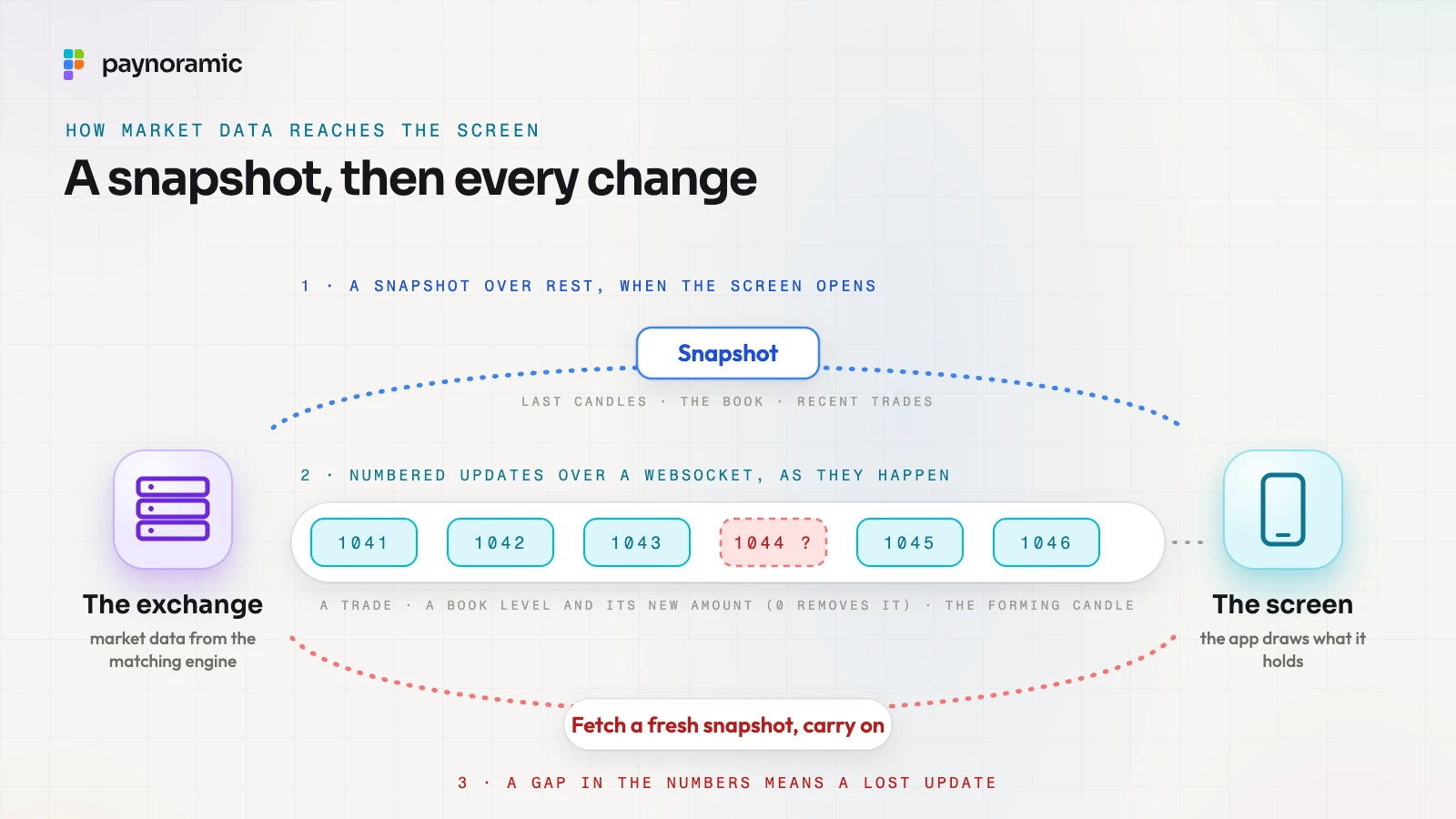
Two practical refinements are common. Book updates are often batched a few times a second, because a phone cannot usefully redraw faster than that; and when the connection drops, the app reconnects and starts again from a snapshot.
The same feed serves more than the screen. Market makers quote from it through the same API, so what a trader sees and what a market maker reacts to come from one source. In Marengo, our exchange, the apps and market makers use the same REST and WebSocket API.
Frequently asked questions
Why do two exchanges show different candles for the same coin? Each exchange builds candles from its own trades, so prices and volumes differ slightly from venue to venue. Interval boundaries and time zones can differ too, though most charts use UTC.
Why does the last candle keep moving? It is still forming. Until its interval ends, every new trade can change its high, low, close and volume; once the interval ends, it is fixed.
Are the order book and the depth chart different data? No. Both come from the same resting orders: the book lists them level by level, and the depth chart draws their running totals across price.
What does a red or green trade on the tape mean? It shows which side started the trade. Green means a buyer took a resting sell order; red means a seller hit a resting buy order.
See it working
The quickest way to connect the candles, the book and the tape is to watch them move together. Open Marengo at marengo.paynoramic.com, switch to Pro and place a small order to see it reach the tape and the chart, or read about the white-label crypto exchange to see what is built and handed over.