Native iOS and Android apps for a crypto exchange: what Apple and Google require
Apple and Google publish a crypto exchange app only where the operator is licensed, and only from the operator's own organisation account. Underneath, the app runs on the same backend as the web.
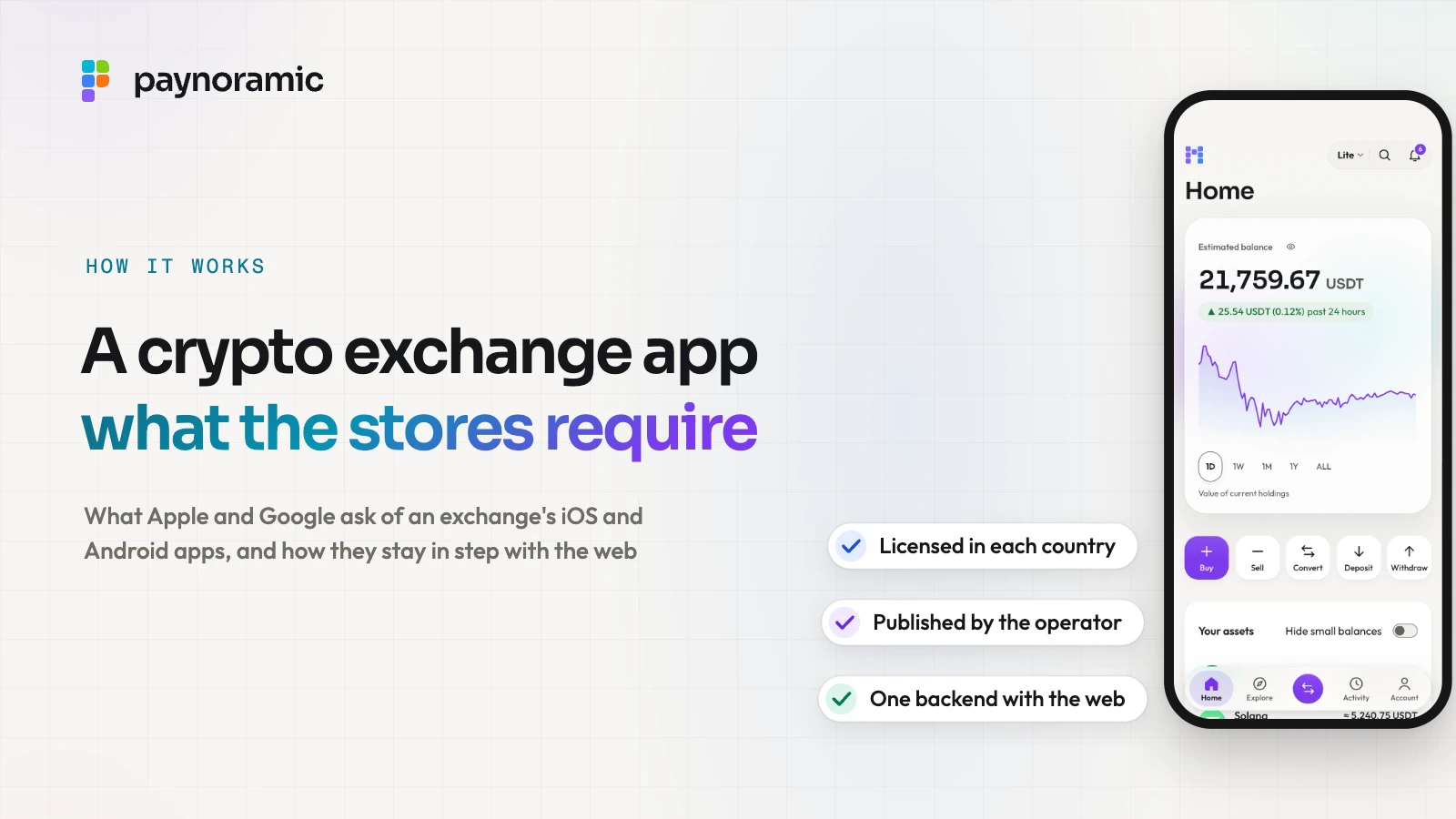
A crypto exchange can put native iOS and Android apps beside its web exchange, but Apple and Google decide where those apps appear and who may publish them. Both stores offer an exchange app only in the countries where the operator holds the licence to run one, and both expect the operator itself to publish it, as an organisation. Underneath, a well-built app is another window onto the same exchange: one backend, the same markets and the same rules as the web.
Why exchanges ship native apps beside the web
Customers check prices, buy and approve withdrawals on their phones, often away from a desk. A mobile browser can do much of that, but a native app does three things better.
Alerts that arrive. A push notification reaches the phone's lock screen the moment an order fills or a withdrawal is requested, whether the app is open or not.
Sign-in in one touch. A passkey unlocked by a face or a fingerprint, with the key held in the phone's secure hardware.
A place on the home screen. The exchange is one tap away, under its own name and icon.
A phone also has less room than a desk, which is one reason exchanges offer a simple mode beside a pro one, as the guide to designing for beginners and pros explains.
The stores also expect the app to be more than the website in a frame. Apple's App Store Review Guidelines, last updated on 16 October 2026, ask for features that "elevate it beyond a repackaged website". For an exchange, alerts, passkeys and native screens for trading are what do that.
What Apple's App Store Review Guidelines ask
Apple's rules for crypto sit in guideline 3.1.5. For exchanges, apps "may facilitate transactions or transmissions of cryptocurrency on an approved exchange, provided they are offered only in countries or regions where the app has appropriate licensing and permissions to provide a cryptocurrency exchange." Apps that store crypto must be "offered by developers enrolled as an organization".
Guideline 5.1.1(ix) names crypto exchanges among the "highly regulated fields", with banking and financial services, whose apps "should be submitted by a legal entity that provides the services, and not by an individual developer."
Three more rules shape an exchange app in practice.
Account deletion. "If your app supports account creation, you must also offer account deletion within the app" (5.1.1(v)).
A working account for the reviewer. Apple asks for demo account details "if your app includes a login", and for the backend to be on during review (2.1). For an exchange, that means an account that has passed identity checks.
Regulatory papers. Apple's checklist before submission includes "Provide required documentation for apps and features that require regulatory approval" (Before you submit).
What Google Play's policy asks
Google's starting point, in its Blockchain-based Content policy, is that "the purchase, holding, or exchange of cryptocurrencies should be conducted through certified services in regulated jurisdictions." Its cryptocurrency exchanges and software wallets requirements then name the licence country by country. Three of them:
Where the app is offered | What Google Play asks of the developer |
|---|---|
The European Union | Authorised as a crypto-asset service provider (CASP) under MiCA by a national competent authority; since July 2026, Liechtenstein, Iceland and Norway too |
The United Kingdom | Registered with the Financial Conduct Authority (FCA) |
The United Arab Emirates | Licensed by the FSRA, VARA or the DFSA |
The process runs through Play Console. The developer declares the app as a cryptocurrency exchange in the Financial features declaration, and fills in a form for each listed country it targets. Where it lacks the licence, Google is plain: "remove them from your app's targeting countries/regions." In countries not on the list, developers "are expected to obtain any additional licensure requirements per local laws". Non-custodial wallets are outside this policy.
Google's Play Console requirements add that developers of financial services, "cryptocurrency software wallets, and cryptocurrency exchanges" among them, "must register as an Organization", with a D-U-N-S number. Like Apple, Google asks for an active demo account for review.
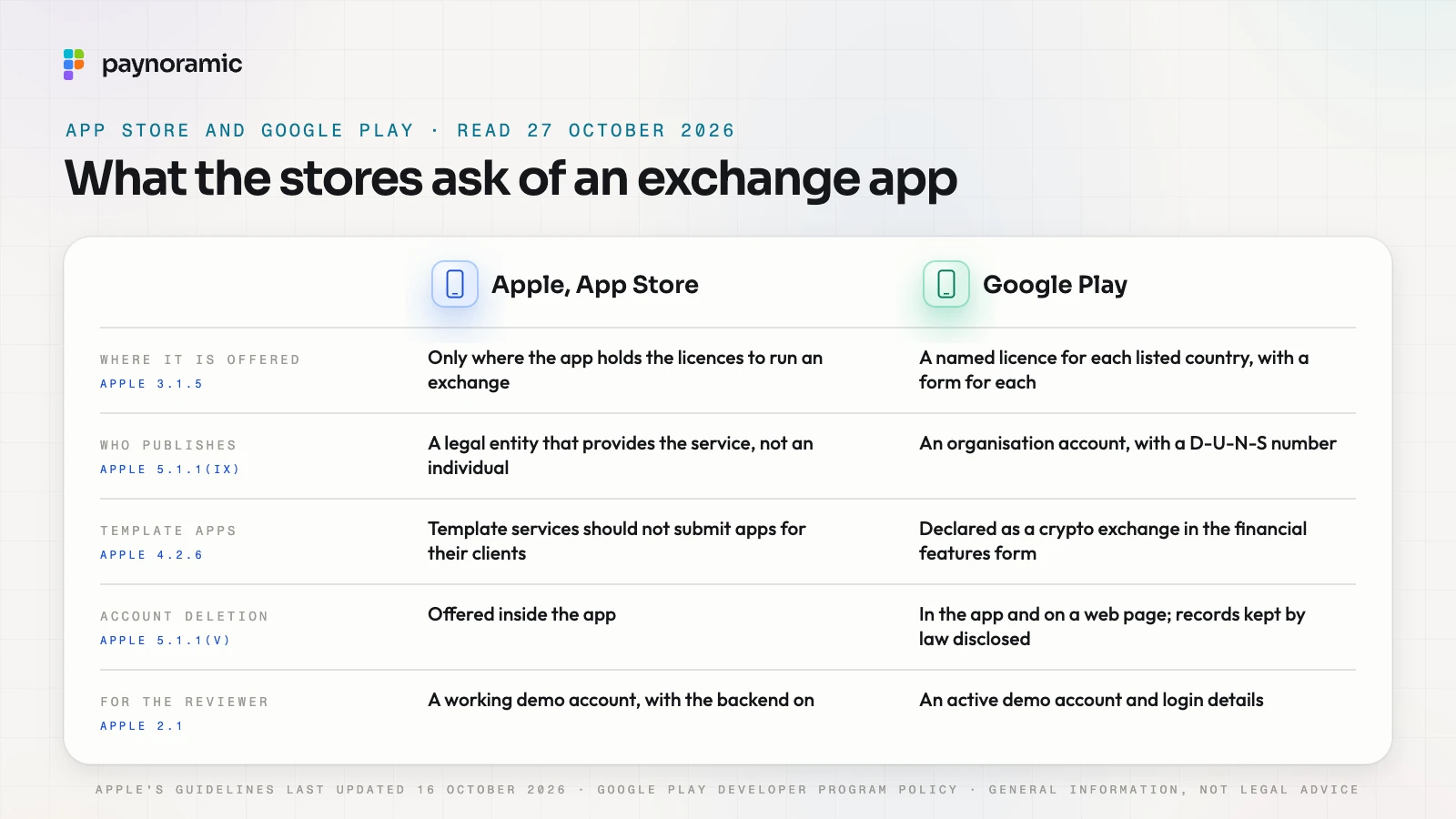
Google also requires account deletion, both in the app and on a web page. An exchange keeps some records by law, and the policy allows for that: "If you need to retain certain data for legitimate reasons such as security, fraud prevention, or regulatory compliance, you must clearly inform users about your data retention practices".
The country list follows the licence
In both consoles the operator chooses the countries where the app is offered, and that list should match its licences. Take an illustrative operator authorised as a CASP in the EU but not registered in the UK. It targets the EU countries, completes Google's EU form, and leaves the UK off both stores.
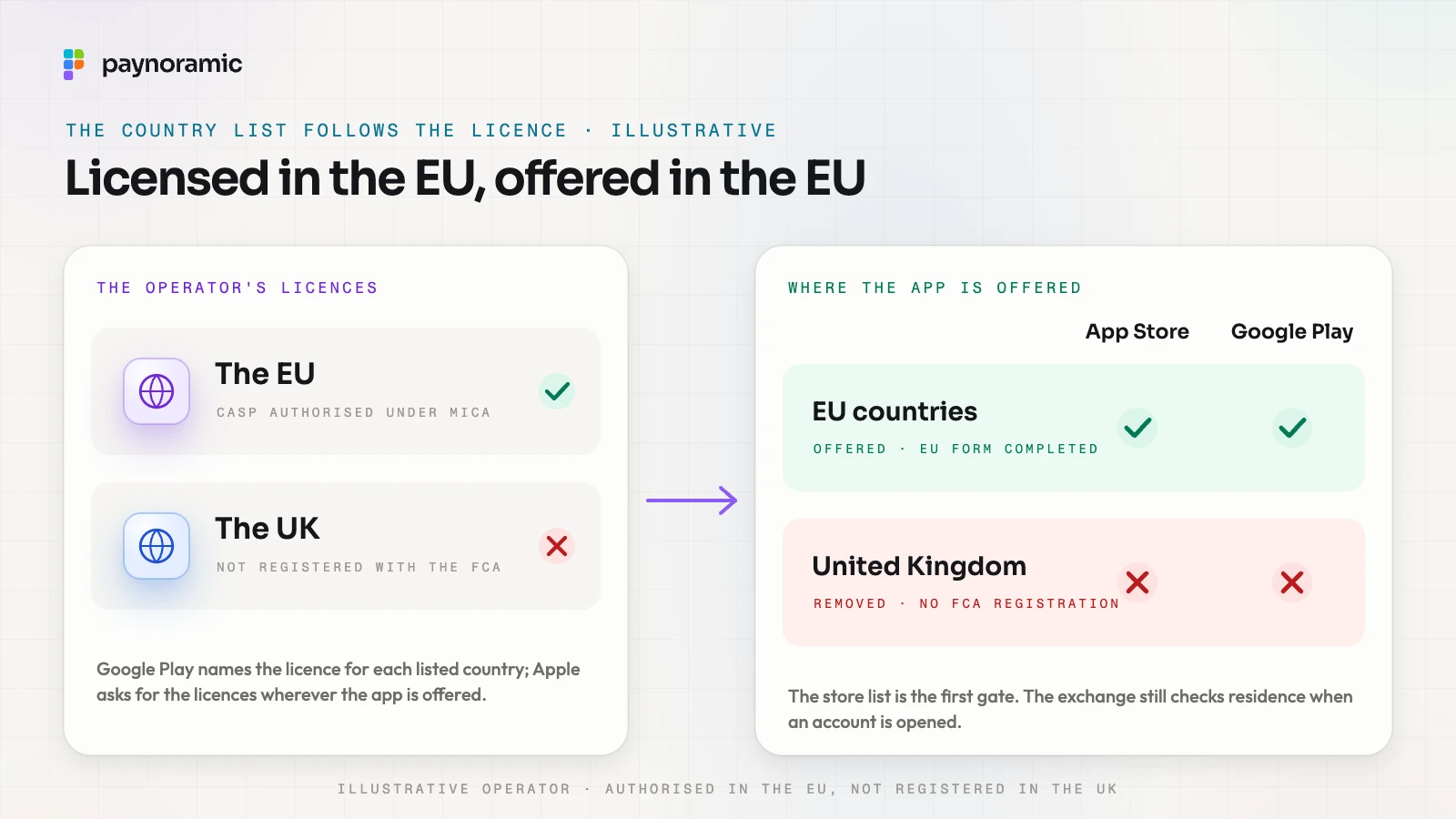
The store's list is only the first gate. A customer can download an app in one country and live in another, so the exchange still checks residence when an account is opened, as the MiCA checklist and the guide to the UAE's three regulators describe. This is general information, not legal advice.
Who publishes a white-label app
The app on the store carries the operator's name, not its software supplier's. Apple says so directly for apps built from a template or an app generation service (4.2.6): they are rejected unless submitted by the provider of the app's content, and "these services should not submit apps on behalf of their clients."
For a white-label exchange, that settles the roles.
The operator enrols in the Apple Developer Program and in Play Console as an organisation, under its own legal name.
The software provider builds the apps under the operator's brand and hands over what is needed to sign and submit them.
The operator submits, answers the reviewers, completes the licence forms and holds the store listings, the privacy policy and the support address.
This matches who answers to the regulator. The operator is licensed and runs the exchange; the software supports its controls.
Passkeys and device security on a phone
Passkeys, the withdrawal whitelist, the device list and alerts are covered in the guide to account security on a crypto exchange. On a phone, one more piece matters: tying the app to the exchange's domain.
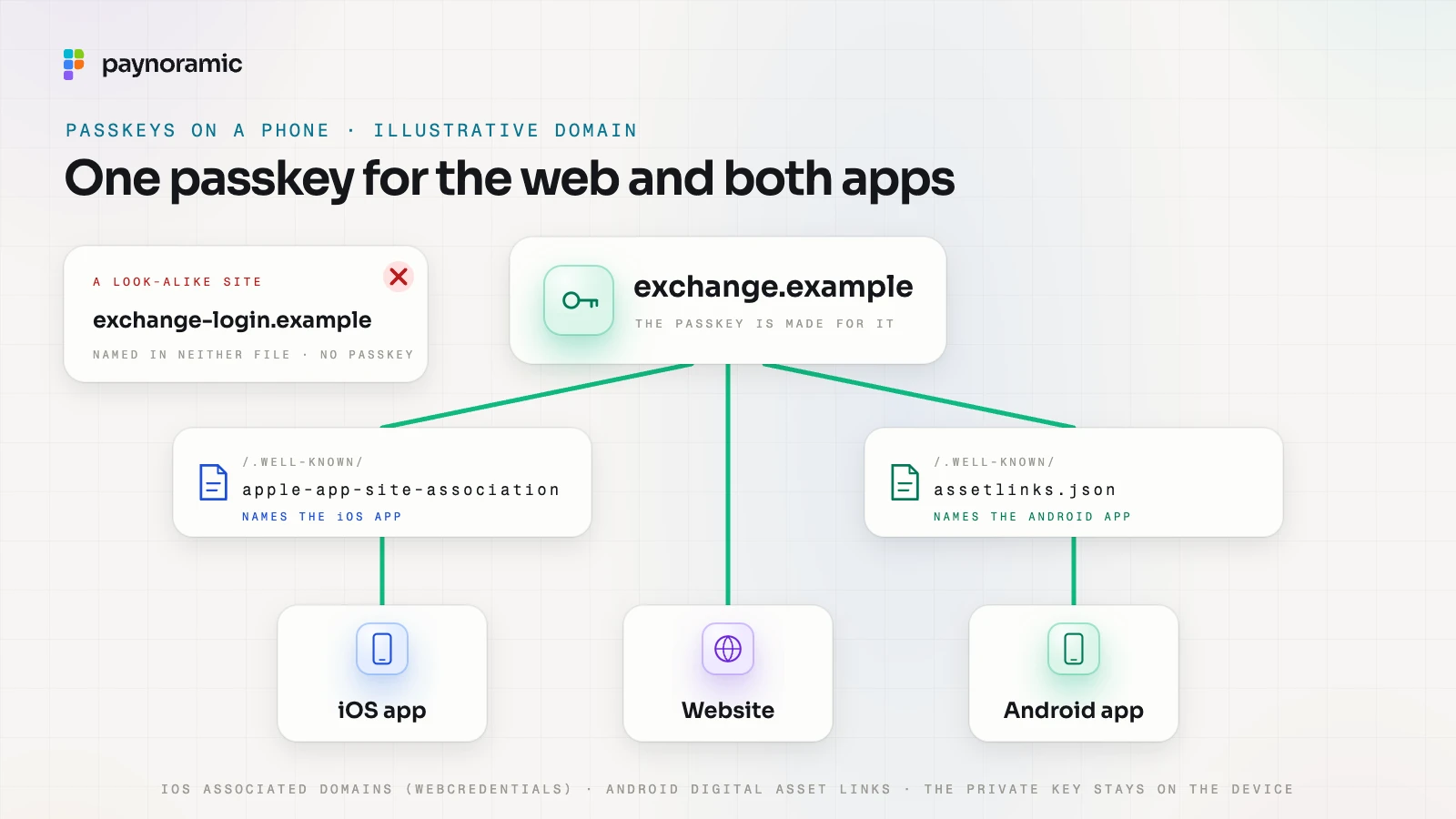
A passkey is made for a domain, say exchange.example. A native app is not a web page, so each platform needs proof that the app belongs to that domain.
iOS. The app declares the domain as an associated domain, and the domain publishes a file at /.well-known/apple-app-site-association naming the app. Apple's passkey documentation is firm: "Your app can't use passkeys to authenticate for services that you haven't configured as the app's associated domains."
Android. The domain publishes /.well-known/assetlinks.json naming the app and its signing certificate. Android's Credential Manager guide notes that "Using Digital Asset Links is required for passkeys".
With both files in place, the passkey a customer made on the website works in the app, and the other way round.
The phone adds its own layers. Private keys sit in secure hardware and never leave it, and the face or fingerprint only unlocks them on the device. Apple's App Attest and Google's Play Integrity API let the exchange's server check that a request comes from a genuine copy of its app. Each signed-in phone is a session on the server, which the customer can revoke from the device list like any browser.
Push notifications
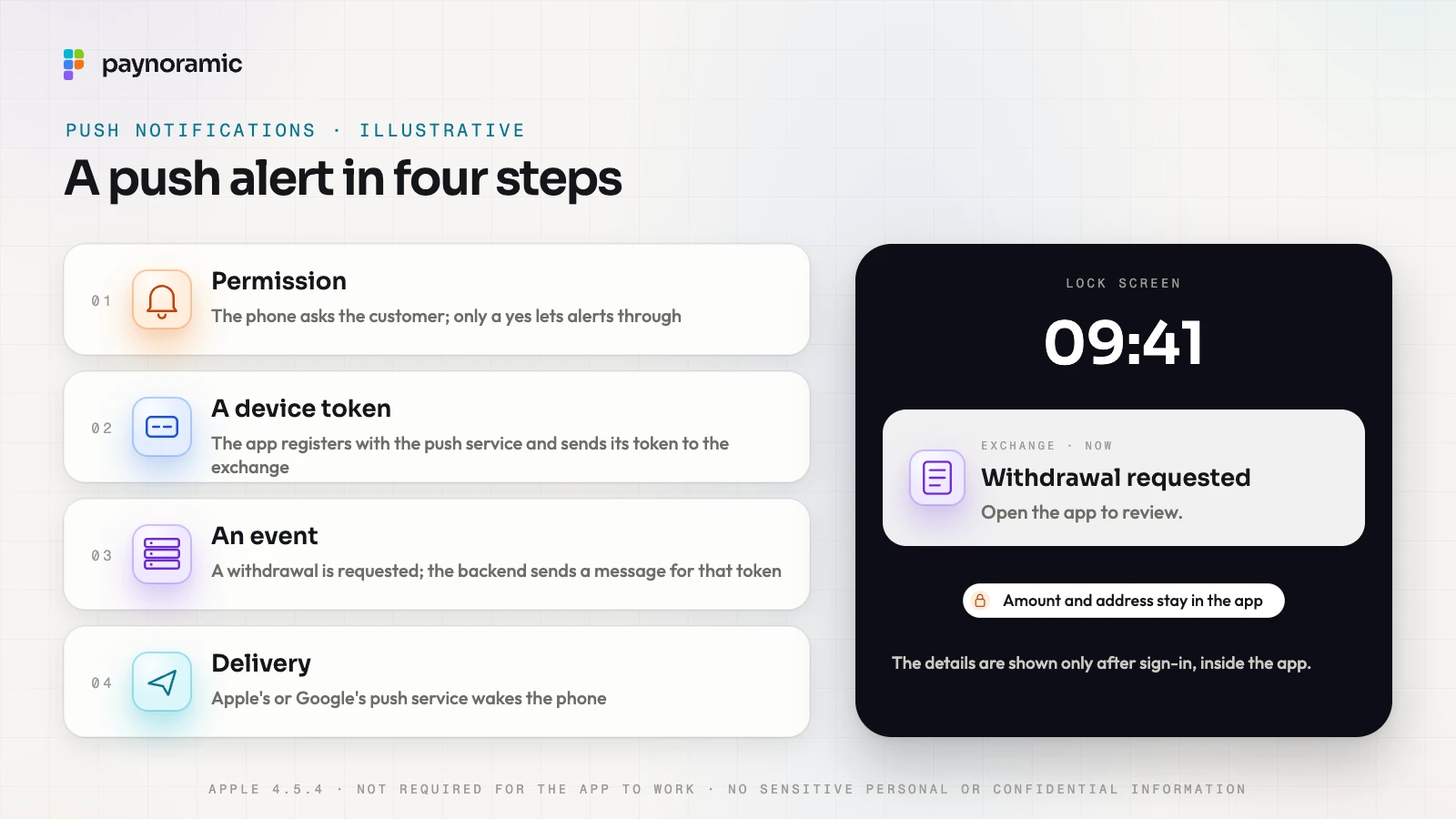
A push notification takes four steps.
Permission. The phone asks the customer whether the app may send notifications. Only a yes lets alerts through.
A device token. The app registers with Apple's or Google's push service, receives a token for that phone and sends it to the exchange's backend.
An event. A withdrawal is requested. The backend sends a message for that token to the push service.
Delivery. The push service wakes the phone and shows the alert.
Apple sets limits on what goes in it (4.5.4): push notifications "must not be required for the app to function, and should not be used to send sensitive personal or confidential information." Marketing needs an explicit opt-in and a way out.
So a good exchange alert says what happened and keeps the details behind sign-in: "Withdrawal requested. Open the app to review." The amount and the address wait in the app. A well-built exchange also sends security alerts by email, so a customer who turned notifications off still hears about a withdrawal. The notifications module is the building block behind them.
How the app stays in step with the web
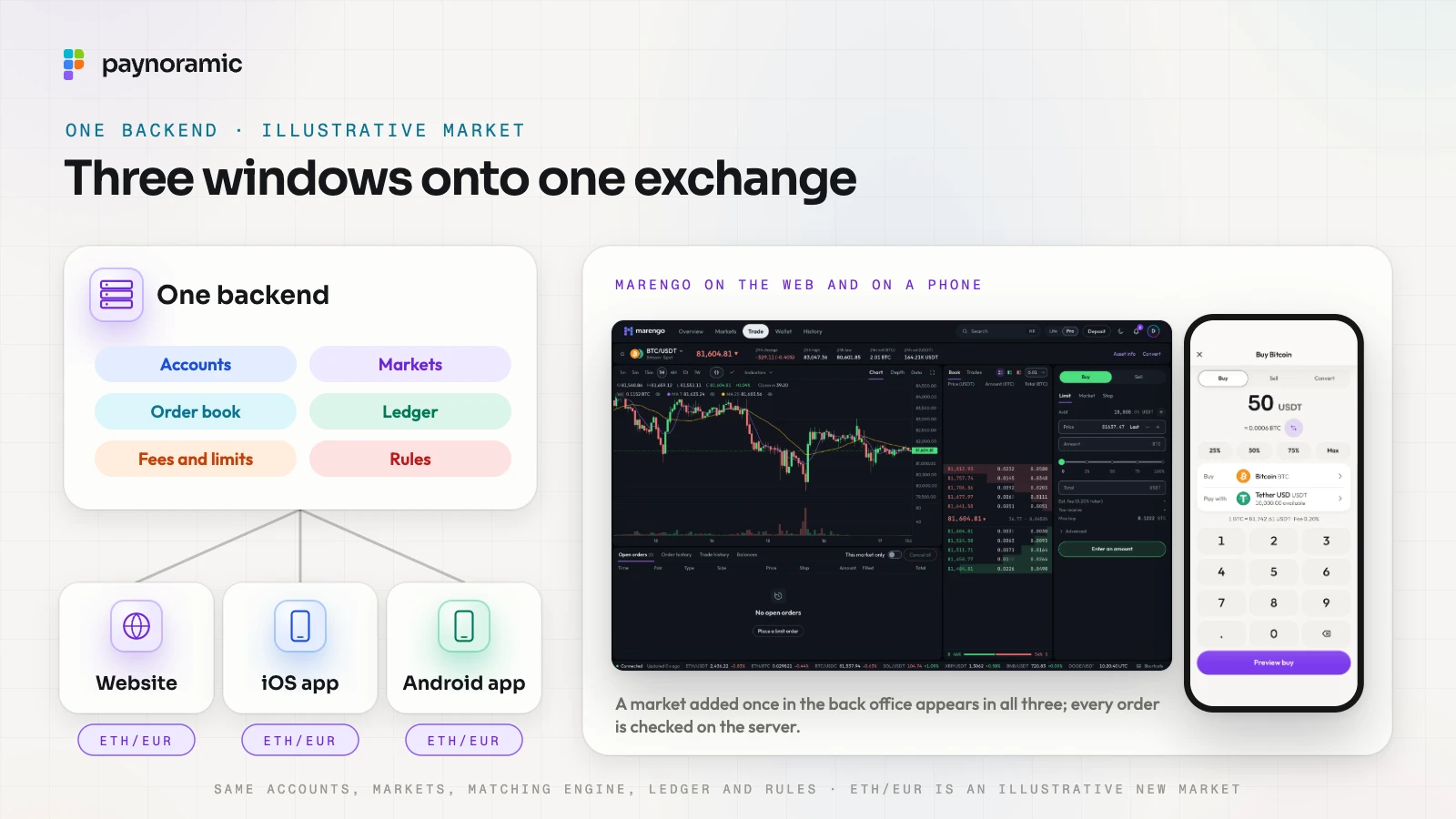
The apps and the website should be three windows onto one exchange, not three products. They call the same backend: the same accounts and identity checks, the same matching engine and order book, the same ledger and balances.
What the customer sees should come from the server too.
Markets. The list of markets, their tick sizes and their status are served by the backend. A market added once in the back office appears on the web and in both apps.
Rules. Fees, limits, the withdrawal whitelist and any market a customer may not trade are checked on the server when an order or withdrawal arrives. An app that shows the wrong screen still cannot break a rule.
Versions. A store update can take days to reach every phone, so the backend tells old app versions when they must update before they can trade.
Words. Translations and legal texts come from the same source as the website's, so a change reaches every screen together.
Marengo, our exchange, has native iOS and Android apps beside its web exchange.
Frequently asked questions
Can the software provider publish the app for the exchange? Not under these rules. Apple asks template services not to submit apps on behalf of their clients and wants regulated apps submitted by the legal entity that provides the service. Google asks crypto exchanges to register as an organisation.
Can an exchange list its app everywhere and block customers inside it? Both stores expect the opposite. Apple allows exchange apps only where the app has the licences, and Google asks developers to remove countries where they lack them. The exchange still checks residence at sign-up.
Does deleting an account erase records the exchange must keep? Both stores require account deletion. Google's policy allows data kept for security, fraud prevention or regulatory compliance, if the privacy policy says so.
Do customers need a new passkey for the app? No, if the app is associated with the exchange's domain. The passkey made on the website then works in the app.
See it working
An exchange's apps are easiest to judge beside its web version. Open Marengo at marengo.paynoramic.com, or read how our white-label crypto exchange is built and handed over to the licensed operator who publishes and runs it.