Simple or pro: designing a crypto exchange for beginners and traders
Most exchanges serve beginners and traders with two modes of one app: a simple buy, sell and convert flow with a preview and receipt, and a pro terminal on the same order book and balance.
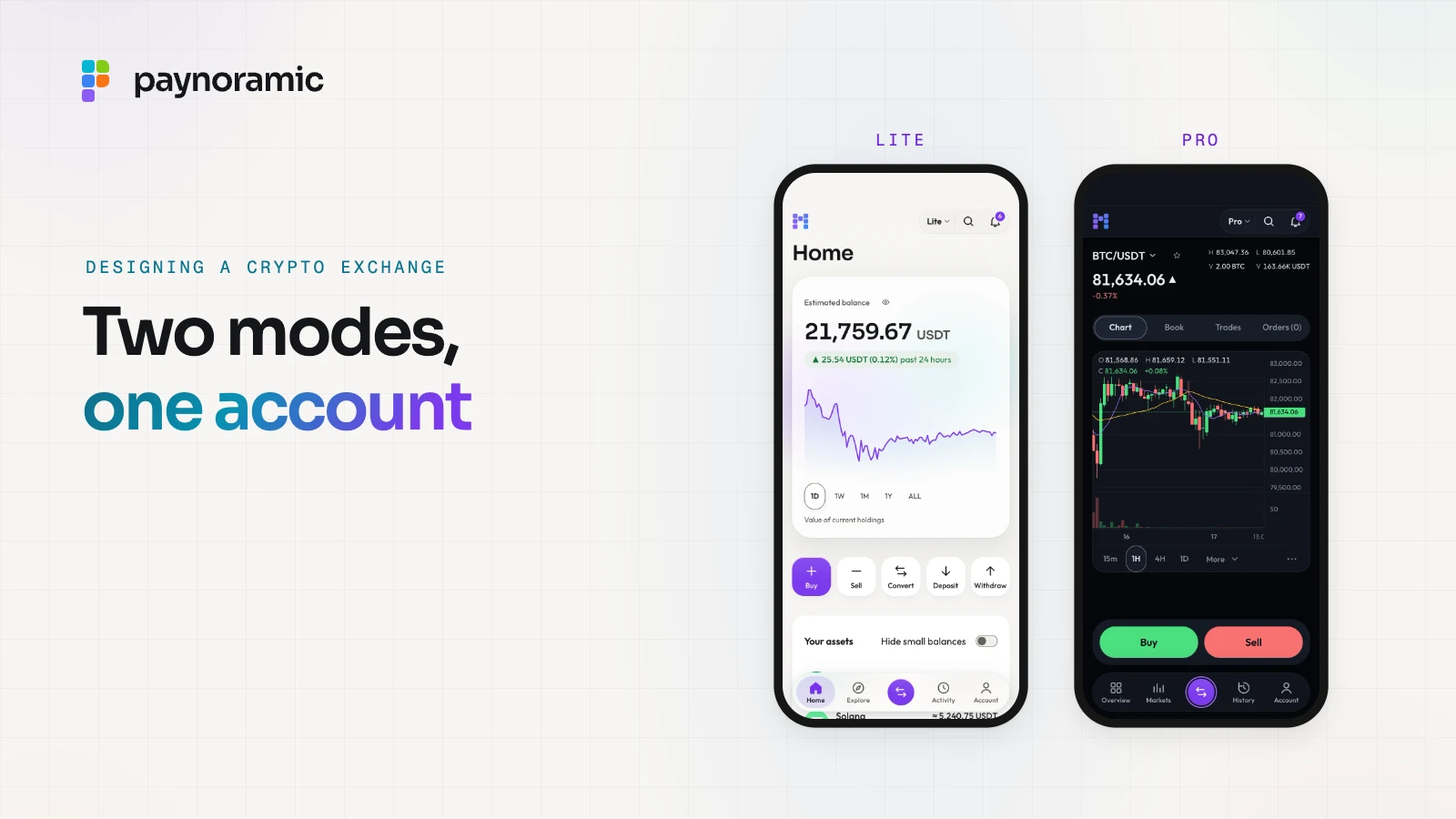
A crypto exchange has two audiences with opposite needs. Beginners want to buy, sell and convert in a few taps and see exactly what they will pay; active traders want a terminal with charts, the order book and every order type. Most exchanges answer both with two modes of one app, on one account and one balance, trading on the same order book. This guide sets out what goes on each screen, the phone-first patterns that make it work, and where the rules on fees and risk shape the design.
Two audiences, one market
The first audience thinks in amounts: "50 euros of Bitcoin". They want a price they can trust, the fee in plain numbers, a button, and proof afterwards that it happened, not an order type or a depth chart.
The second audience thinks in prices and time. They place a limit order below the market, protect a position with a stop-loss order, watch the order book for size, and switch the chart from one-minute to daily candles. For them, every extra tap between a decision and an order is a cost.
Both trade the same asset in the same market, and a good design starts there.
Why one account and one balance, not two apps
Most exchanges offer both experiences as modes of one app rather than two separate apps, for practical reasons:
One verification and one balance. A user who grows from buying monthly to trading actively does not open a second account, pass identity checks again or move funds between products. The switch is a setting, not a migration.
One price. When both modes send orders to the same matching engine, the price a beginner sees is the order book's price, not a separate quote from a separate desk.
One set of records. Every fill, fee and transfer lands in the same ledger, so support, statements and reconciliation never have to merge two histories.
One product to build, brand and test. Deposits, withdrawals, settings and verification exist once, and a white-label operator brands one app.
The design work is deciding which mode a new user sees first (usually the simple one), where the switch lives (somewhere visible but out of the way) and what each mode leaves out.
What goes on the simple screens
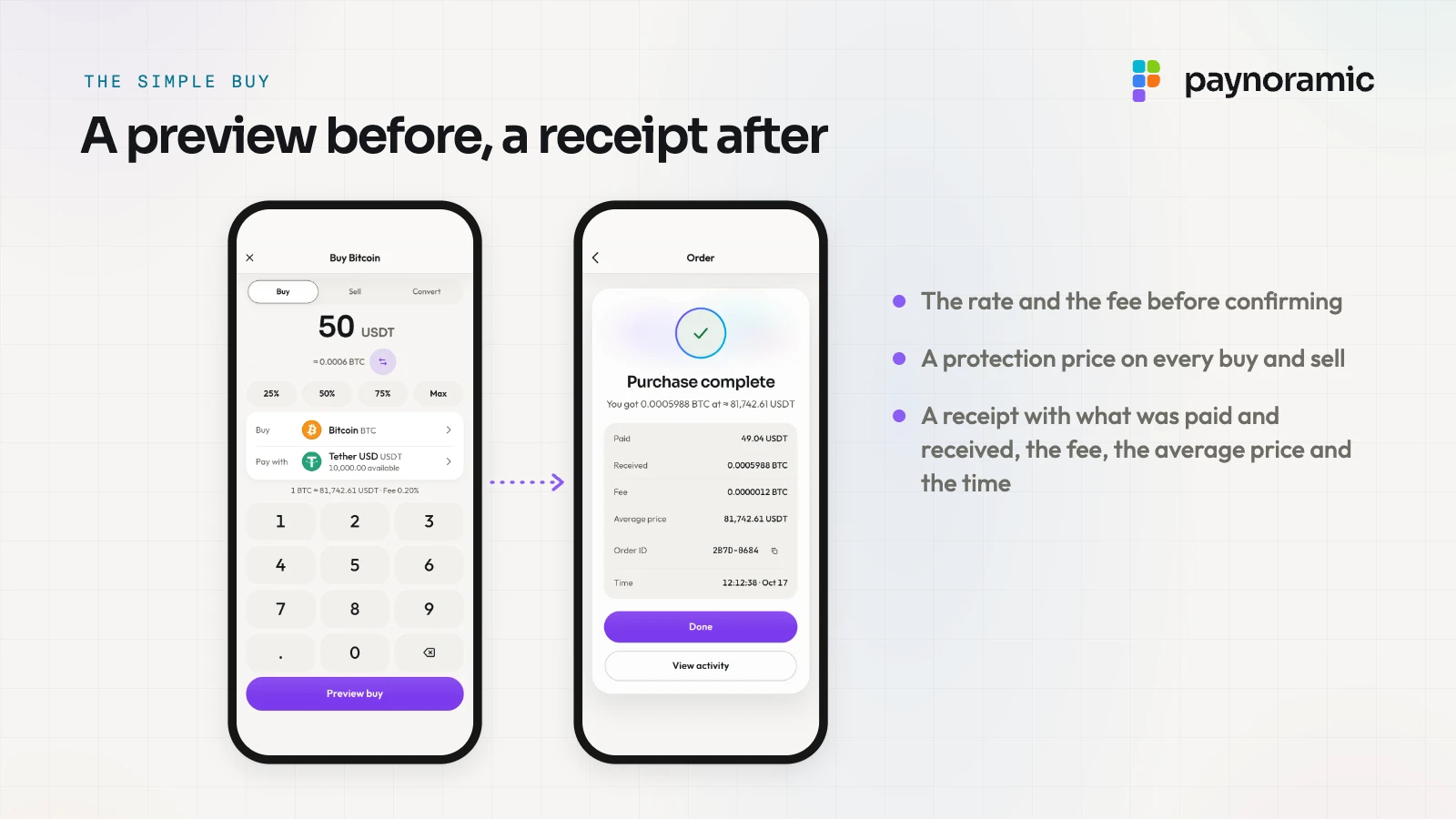
The simple mode is a short set of screens, each with one job:
Home. The estimated balance across all assets with a chart of it, and quick actions: buy, sell, convert, deposit, withdraw.
Explore. The assets on offer, with prices and the day's movers, searchable.
An asset page. The price, a chart with a few ranges, the user's holding, and buy and sell buttons. This is also where asset information and risk material naturally sit.
Buy, sell or convert. The user enters an amount, in money or in the asset, and sees an estimate update as they type.
Preview. Before anything is sent: what they pay, what they receive, the rate, the fee and the worst price the order will accept.
Receipt. What was paid, what was received, the fee, the average price, an order ID and the time.
Activity. Every order and transfer, each opening its receipt again.
Underneath, a simple buy is usually a market order on the same order book the terminal shows. A market order fills against whatever is resting there, so in a fast or thin market the average price can drift from the price shown: slippage. The usual protection is a limit hidden behind the friendly screen, a price beyond which the order will not fill, which turns "buy now" into "buy now, but not at any price".
What goes on the terminal
The pro mode is dense on purpose. The standard parts are:
Candles with intervals (minutes to days) and indicators such as moving averages and volume.
A depth chart, the cumulative size on each side of the book, which shows at a glance where large orders sit.
The order book, with price grouping (so a trader can see levels at 1, 10 or 100 units instead of every tick) and depth bars behind each row.
The trades tape, every trade as it executes, with price, size and time.
An order ticket for limit, market and stop orders, with the fee and the total before submitting.
Open orders, order history and fills, with cancel on each open order and an export for record keeping and tax.
On a desktop this fits on one screen; on a phone it becomes a stack, with tabs for the book, trades and orders, and the ticket opening over them.
Simple mode | Pro mode | |
|---|---|---|
The user enters | An amount | A price, a size and an order type |
Market view | Price and a chart | Candles, depth chart, order book, trades tape |
Order types | Buy, sell, convert | Limit, market and stop |
Before confirming | A preview: rate, fee, worst price | The ticket: fee and total |
After | A receipt | Open orders, history and fills |
Fees and previews before confirming
A preview is the screen where design and regulation meet. In the EU, the Markets in Crypto-Assets Regulation (MiCA) requires crypto-asset service providers to give clients information that is "fair, clear and not misleading", to warn them of the risks of crypto transactions and, when operating a trading platform, to link the white papers of the crypto-assets concerned (Article 66(2) and (3)). Their policies on pricing, costs and fees must be public "in a prominent place on their website" (Article 66(4)).
The same regulation shapes both modes. A trading platform must make bid and ask prices and the depth at those prices public continuously during trading hours, and the price, volume and time of executed trades as close to real time as is technically possible (Article 76(9) and (10)): the order book and the trades tape. Its systems must be able to reject orders that exceed pre-determined volume and price thresholds or are clearly erroneous (Article 76(7)(d)). The operator's own obligations under MiCA are set out in the MiCA checklist.
In the UK, the FCA's rules for direct offer financial promotions of qualifying cryptoassets to retail clients (COBS 4.12A) add steps to a first-time user's journey: a cooling-off period of at least 24 hours (COBS 4.12A.18R), a personalised risk warning, client categorisation and an appropriateness assessment (COBS 4.12A.15R). Promotions carry a prescribed risk warning (COBS 4.12A.11R). Registration and authorisation are covered in the FCA guide.
In Dubai, VARA's Exchange Services Rulebook asks exchanges to publish, for each virtual asset offered, a summary including its name and symbol, issue date, market capitalisation, circulating supply, any smart contract audit and its largest fall in price, and to describe how they determine the prices they quote (Rule II.B.1).
A good preview, in any market:
The fee is a number in the currency the user paid with, not only a percentage.
What they pay and what they receive are both on screen, before and after.
The confirm button names the action ("Buy BTC"), and the worst price the order accepts sits next to it.
The receipt repeats the preview with the actual result, so any difference is visible.
How not to overwhelm a beginner
Most of the work in the simple mode is leaving things out:
Start simple, switch on purpose. New users land in the simple mode, and the terminal is one clear switch away rather than a default.
One decision per screen. Amount, then preview, then confirm. No order type picker, no chart controls in the flow.
Plain words. "You pay", "You receive", "Fee". Terms such as "taker" or "slippage" appear in the terminal, or behind an explanation.
Sensible defaults. A protection price set for the user, the chart on a readable range, the asset they came from already chosen.
Errors that say what to do. "This amount is below the minimum for this market" rather than a code.
Phone first
Phone first means the simple mode is designed on a phone before a desktop, and the terminal is made to fit a phone too. The patterns that recur:
An installable web app. A progressive web app can be added to the home screen and opens full screen, like a native app, without an app store listing for every update.
Large titles and a floating tab bar. Four or five destinations (home, explore, trade, activity, account) within the thumb's reach, the current screen named in large type.
Bottom sheets. Order tickets, filters and confirmations slide up from the bottom over the current screen, so the user keeps their place.
Full-screen flows. A buy, a deposit or a verification takes the whole screen until it is done or cancelled, with clear transitions in and out.
Light and dark
Some users want a dark screen for long sessions at a chart; others keep everything light. The usual answer is both, following the system setting by default with a manual switch. Both have to be designed, not inverted: green and red need contrast on each background, charts must stay legible, and the logo needs a version for each.
How Paynoramic's exchange handles it
Paynoramic's white-label crypto exchange works this way, and you can see it in Marengo, our exchange, with prices that follow the real market. Lite and Pro are two modes of one app: one switch moves between them on the same account, in light or dark, and both trade on the same matching engine, on the web and on the phone.
Lite has Home with the balance and its chart, Explore, a page for every asset, and Buy, Sell and Convert with a preview and a receipt. The rate and fee show before confirming, there is a protection price on every buy and sell, and the receipt carries what was paid, what was received, the fee, the average price, the order ID and the time.
Pro is a trading terminal: candles with intervals and indicators, a depth chart, the order book with grouping and depth bars, the trades tape, and limit, market and stop orders, with open orders, history and fills, and history export to CSV.
On a phone Marengo behaves like an app, with large titles, a floating tab bar and bottom sheets, and it installs on the home screen.
Themes are light and dark, following the system.
The quickest way to judge a simple and pro design is to use it. Open Marengo at marengo.paynoramic.com on your phone or computer, buy in Lite, then switch to Pro and find the same trade in your fills, on the same market. If you are planning an exchange of your own, the crypto exchange page shows what is handed over.