Account security on a crypto exchange: passkeys, withdrawal whitelists and new-device alerts
A password and an SMS code can be phished or redirected. Passkeys resist phishing, a whitelist makes new withdrawal addresses wait, and a device list and alerts let the owner act first.
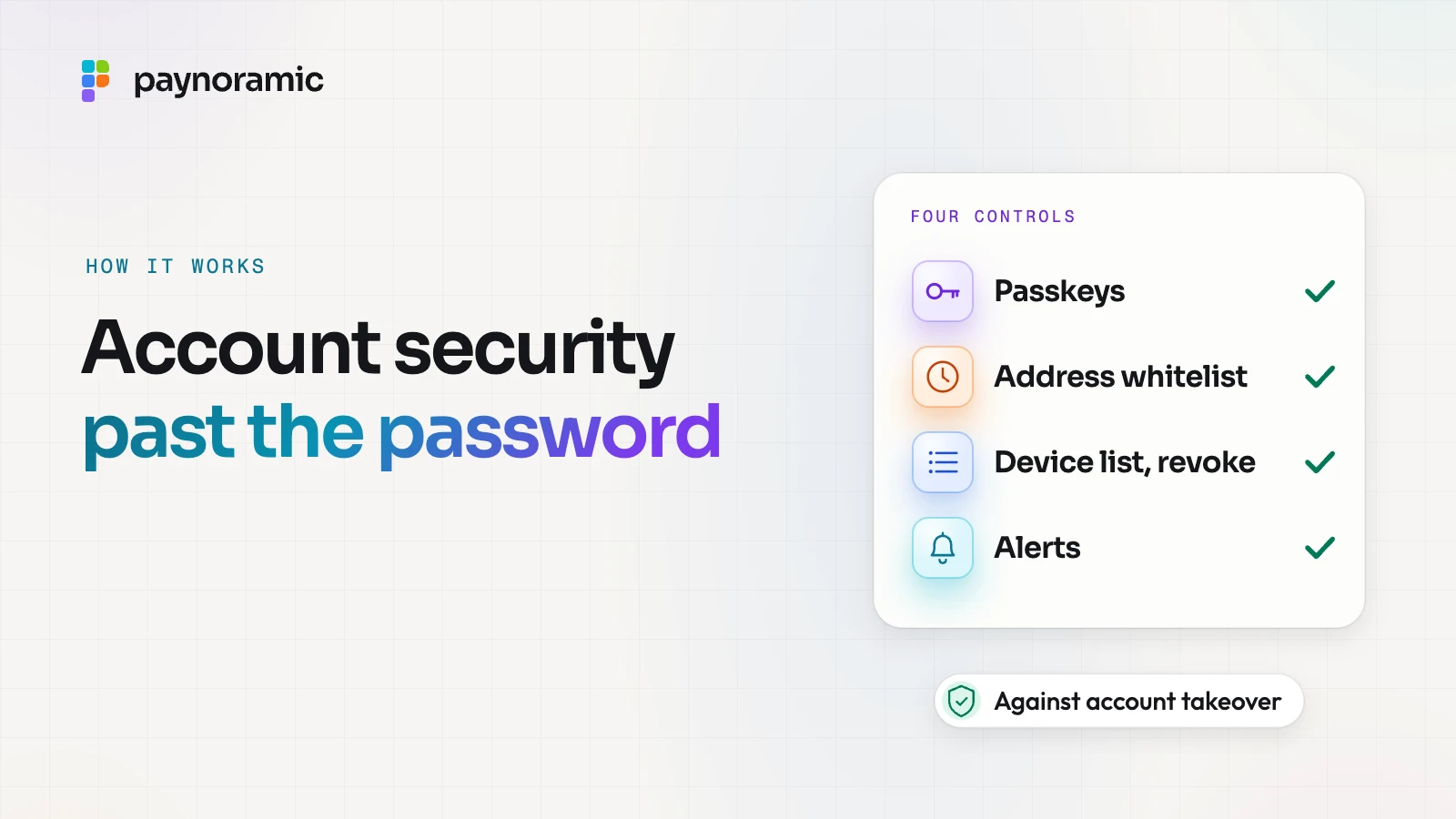
On a crypto exchange, an attacker who signs in as a customer can send the balance to an address of their own, and a blockchain transfer cannot be called back. Passwords and SMS codes are easy to phish or redirect, so a well-built exchange layers four controls: passkeys that a fake site cannot use, a withdrawal whitelist that makes new addresses wait, a list of devices and sessions the customer can revoke, and alerts that tell the owner at once. Each covers for the others when one fails.
Why passwords and SMS codes fall short
Most account takeovers do not break any cryptography. They trick the customer, or the customer's phone company.
Phishing and relay. A look-alike page, say exchange-login.example instead of exchange.example, asks for the password and then the code from the SMS. It passes both straight to the real site and signs in as the customer, all within the code's lifetime.
SIM swap. The attacker persuades or bribes a mobile operator to move the customer's phone number to a SIM they hold. Every code sent by text message now arrives on the attacker's phone.
Reused passwords. A password leaked from another service is tried on the exchange, and works if the customer used it twice.
The US standards body NIST says this plainly in its digital identity guidelines, SP 800-63B-4: passwords are not phishing-resistant, and authenticators whose output is typed in by hand, such as one-time codes, "SHALL NOT be considered phishing-resistant", because an impostor can relay what was typed. The same guidelines treat codes sent over the phone network as a restricted authenticator, and ask verifiers to watch for risk signs such as a SIM change or a number port before sending one.
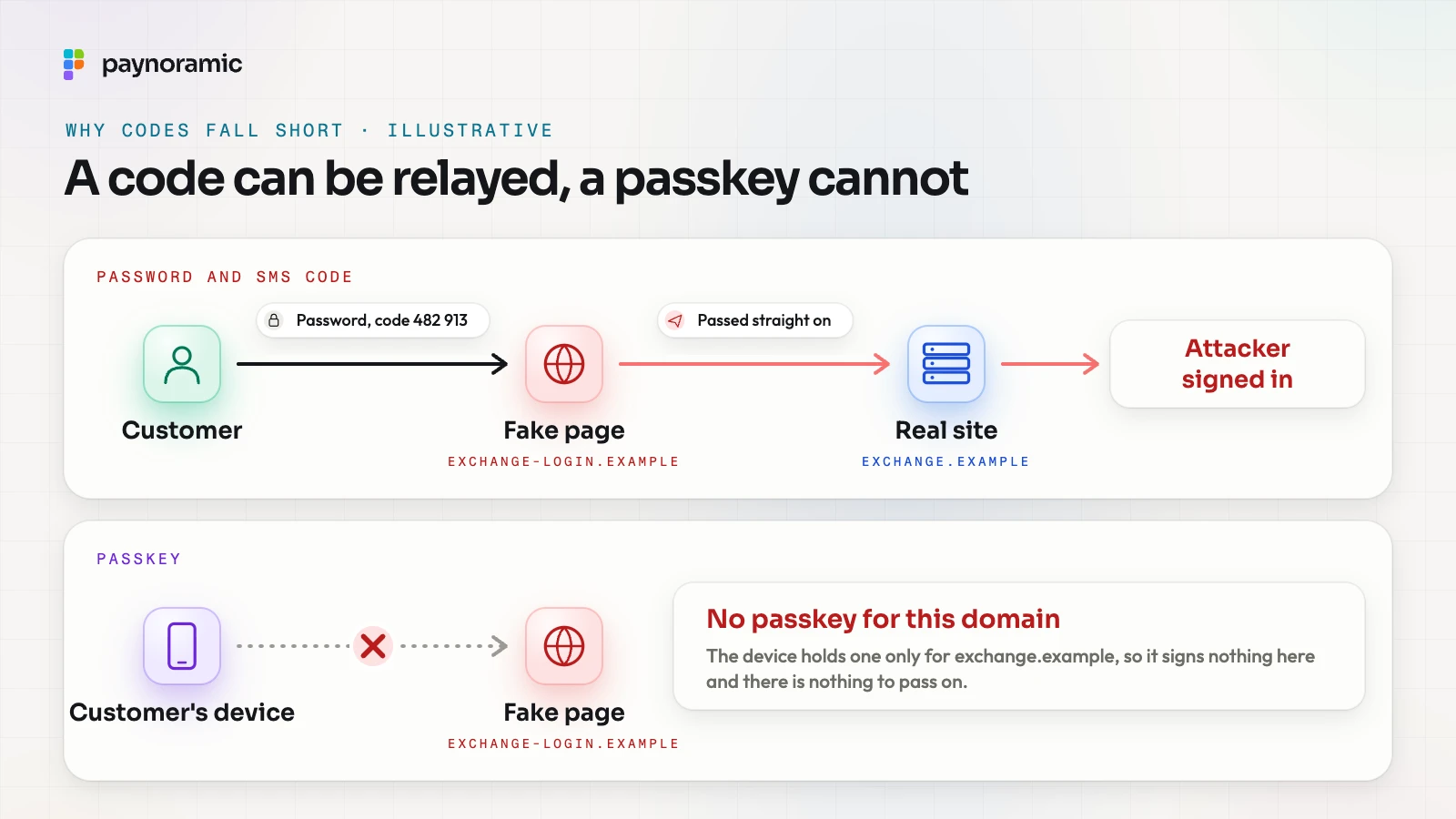
A code still adds something: a stolen password alone is not enough. But it does not stop the attack that matters most, a convincing fake page, and that is the gap passkeys close.
How a passkey works
A passkey is a credential built on the W3C Web Authentication standard (WebAuthn), which became a W3C Recommendation at Level 3 on 25 August 2026, and on the FIDO Alliance's specifications. Instead of a shared secret that the customer types and the exchange stores, it is a key pair made for one site.
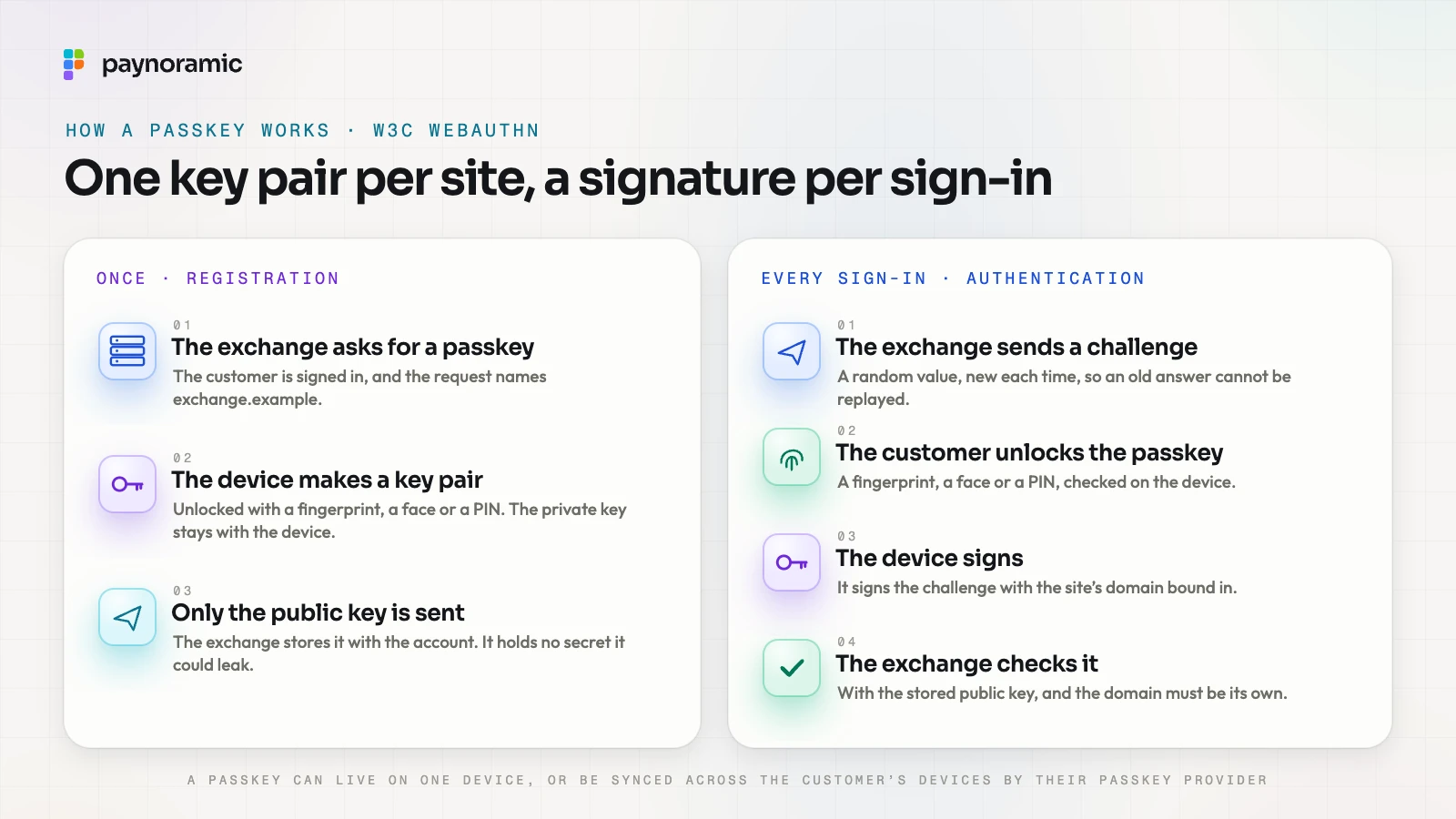
Registering a passkey happens once, while the customer is signed in.
The exchange asks the browser or app to create a passkey for its own domain, exchange.example.
The customer unlocks the device with a fingerprint, a face or a PIN, and the device makes a new key pair for that domain.
The private key stays with the device. Only the public key goes to the exchange, which stores it with the account.
Signing in then works by signature, not by typing.
The exchange sends a challenge: a random value, new every time. The standard requires challenges to be generated randomly in an environment the site trusts, such as its server, and recommends at least 16 bytes, so an old answer cannot be replayed.
The customer unlocks the passkey with a fingerprint, a face or a PIN, checked on the device.
The device signs the challenge together with the address of the site that asked.
The exchange checks the signature with the public key it stored, and checks that the address is its own.
Why a fake site gets nothing
A passkey is scoped to the site that created it. The standard says a credential "can only be accessed by origins belonging to" that site, enforced by the browser and the authenticator together (WebAuthn, section 1). On exchange-login.example the device finds no passkey to use, so it signs nothing, and the customer has nothing to type that could be relayed. The exchange also checks the origin in every signed response, as a second lock.
Two more properties matter to an operator. The exchange holds only public keys, so a leak of its database gives an attacker nothing to sign in with (WebAuthn, section 13.4.1). And the fingerprint or face never leaves the device: it only unlocks the key.
Synced passkeys, and losing a phone
The FIDO Alliance describes passkeys that are synced across a customer's devices by their passkey provider, and passkeys bound to one device, such as a hardware security key. A synced passkey survives a lost phone. A device-bound one does not, so the standard advises registering more than one credential per account, or offering a recovery process (WebAuthn, section 13.4.6). Recovery is now the weakest door, which is why the other three controls matter.
A withdrawal whitelist with a cooling-off period
Even a perfect sign-in can be bypassed: a stolen session, a weak recovery path, a customer talked into approving something. The whitelist protects what the attacker is after, the withdrawal.
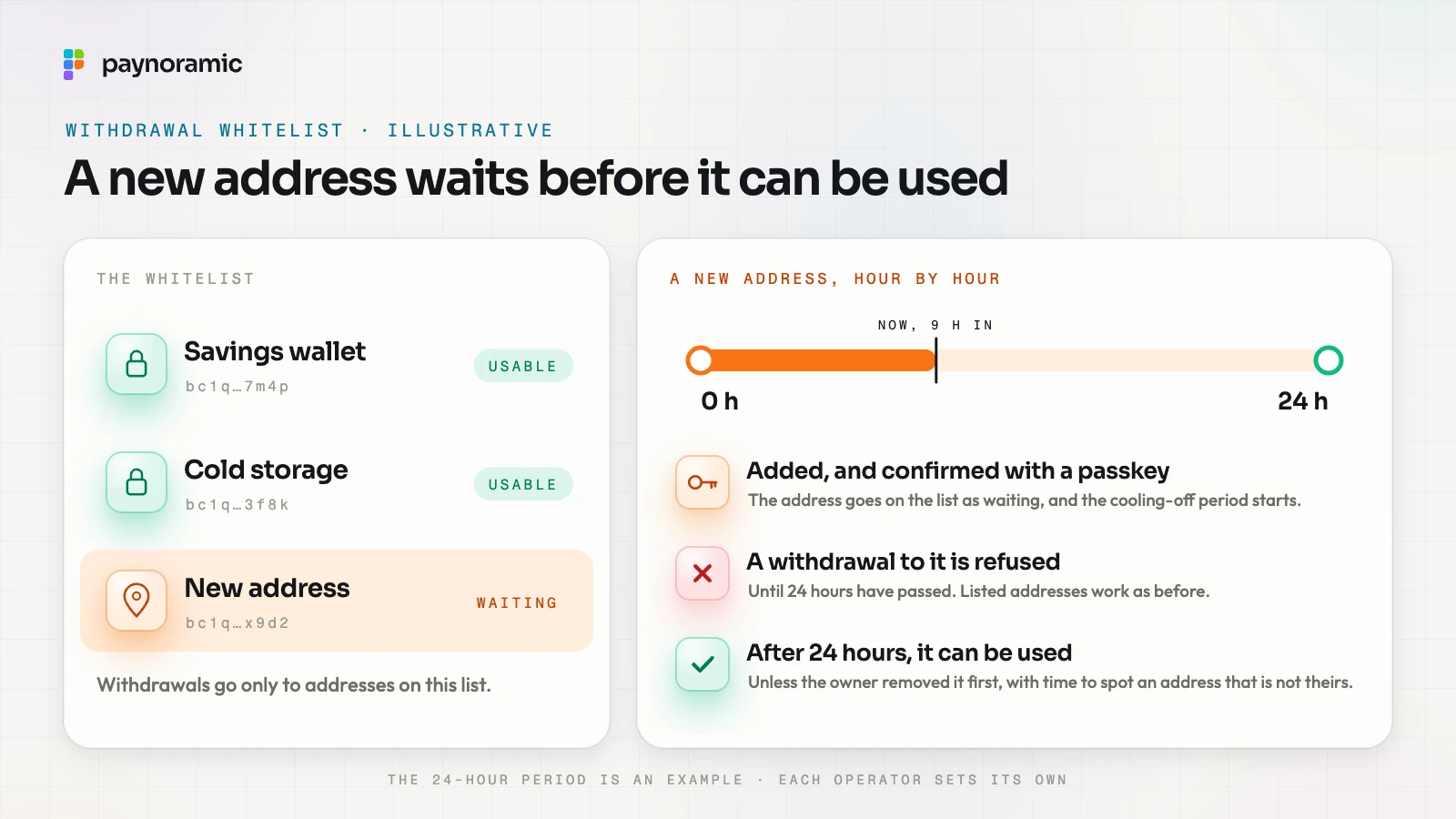
The customer keeps a list of approved wallet addresses, and withdrawals go only to addresses on it. Adding an address is treated as a sensitive change:
Added and confirmed. The customer adds bc1q…x9d2 and confirms with their passkey. The address goes on the list as waiting.
The wait. A cooling-off period starts, say 24 hours in this example. A withdrawal to the new address is refused until it ends. Withdrawals to addresses already listed work as before.
Usable. After 24 hours the address can be used, unless the owner removed it first.
The wait turns a fast theft into a slow one. An attacker who gets in and adds their own address still has to stay unnoticed for the whole period, while the owner gets every chance to see it.
The length is a trade-off each operator sets. A longer wait is safer and slower for a customer who really did just open a new wallet. Some operators let a customer turn the whitelist off, with its own cooling-off period, so an attacker cannot simply switch it off. The checks on the address itself, from the format to the network, are covered in the guide to how a withdrawal reaches the right wallet.
The device and session list
Every sign-in creates a session on a device: a phone app, a laptop browser. The device list shows each one with what it is, when it was last active and whether it is new.
Revoke one. The customer taps Revoke on a session they do not recognise, and the exchange ends it at once: that device is signed out and has to authenticate again.
Revoke all others. After a lost phone or a scare, one action signs out everything but the device in hand.
For this to mean anything, revoking has to end the session on the server, not just hide it in the app. NIST asks for sessions to be easy for the customer to end, and for an account to be notified when an authenticator is added, which is the job of the last control.
Alerts for new devices and withdrawals
An alert turns a silent takeover into one the owner sees. The events that matter most are a sign-in from a new device, a withdrawal requested, and changes to security settings or the whitelist.
A good alert names the event, says what device or address it concerns, and gives one action: "Not you? Revoke it" for a new sign-in, "Not you? Cancel it" for a withdrawal. It goes out through a channel the attacker does not control from inside the session, such as email or a push to another device. NIST's guidelines ask for at least two notification addresses per account, with notifications sent to all of them (SP 800-63B-4, section 4.6).
Alerts also feed the exchange's own controls. A new device followed quickly by a new address and a large withdrawal is a classic pattern for fraud and risk rules to hold for review.
How the four controls fit together
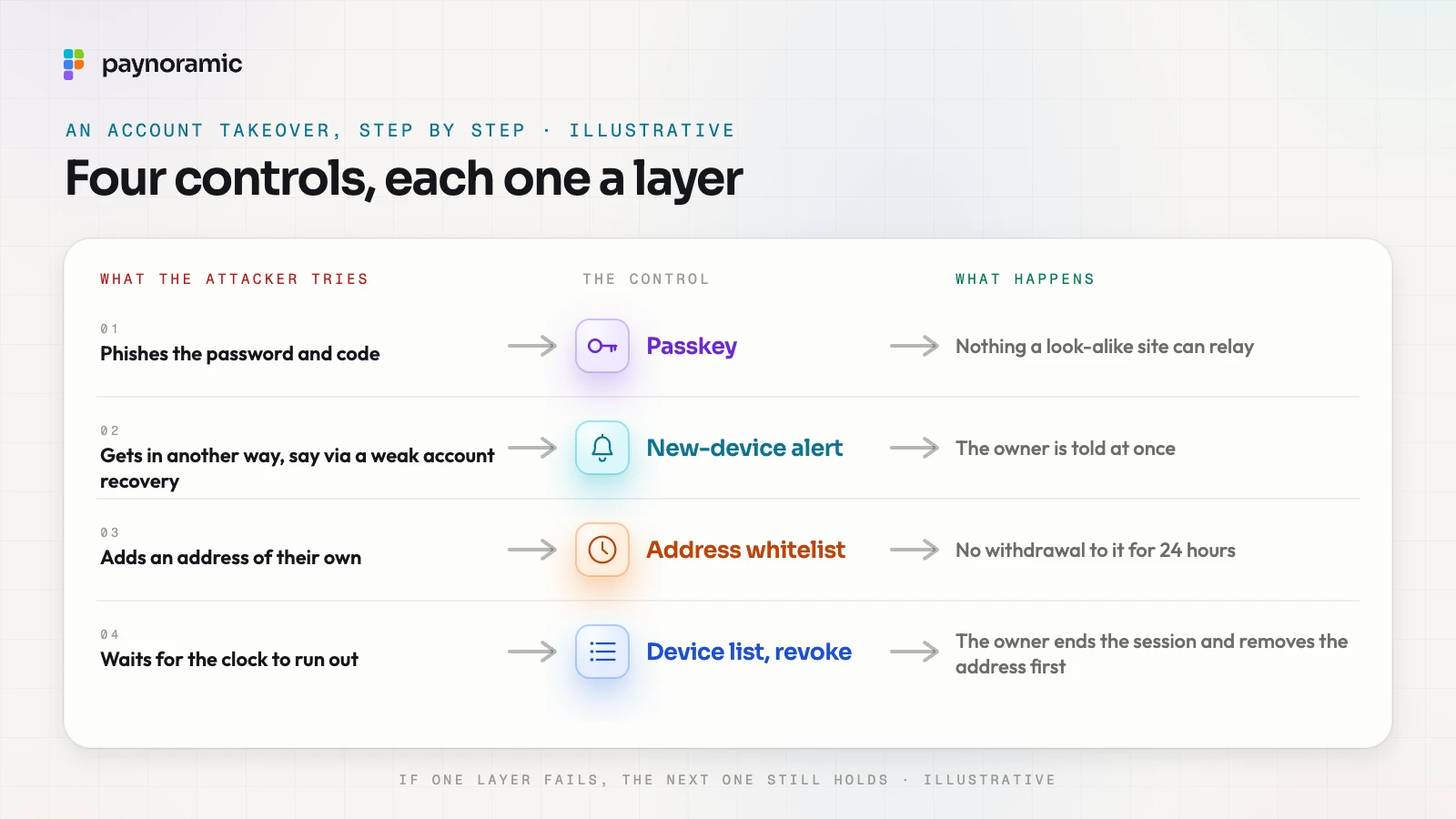
No single control stops every takeover. Together they force an attacker through four doors, any one of which can stop them.
What the attacker tries | The control | What happens |
|---|---|---|
Phishes the password and code | Passkey | Nothing a look-alike site can relay |
Gets in another way, say via a weak account recovery | New-device alert | The owner is told at once |
Adds an address of their own | Address whitelist | No withdrawal to it for 24 hours |
Waits for the clock to run out | Device list with revoke | The owner ends the session and removes the address first |
You can see this in Marengo, our exchange: it has passkeys, an address whitelist with a cooling-off period, a device and session list with revoke, and alerts for new devices and withdrawals. The authentication module and notifications module describe the building blocks behind it.
These controls sit on top of the exchange's own, not instead of them: most customer funds in cold storage, screening of destination addresses, and transaction monitoring.
What EU rules ask for
In the EU, the Digital Operational Resilience Act (DORA) applies to crypto-asset service providers authorised under MiCA (Article 2(1), point (f)). Among its ICT risk management duties, it requires them to "implement policies and protocols for strong authentication mechanisms, based on relevant standards and dedicated control systems" (Article 9(4), point (d)).
DORA does not name passkeys, whitelists or cooling-off periods. It sets the duty; the operator chooses the controls and answers for them. This is general information, not legal advice. With Paynoramic's software, the licence is the operator's: Paynoramic builds and hands over the software, and the operator runs it.
Frequently asked questions
Do passkeys replace passwords completely? They can. Many services start by offering a passkey alongside the password, then let customers drop the password once a passkey is registered. Recovery then needs its own strong path, since it becomes the way around the passkey.
Is an SMS code better than nothing? Yes: it stops a password that leaked elsewhere from working on its own. It does not stop a phishing page that relays the code in real time, or a SIM swap.
How long should the cooling-off period be? There is no standard figure. The 24 hours in this guide is an example. Operators weigh the time an owner needs to notice an alert against the friction for a customer adding a genuine new wallet.
What happens if a customer loses the phone that holds their passkey? A synced passkey is still on their other devices. Otherwise they sign in with a second registered passkey or go through account recovery, which should itself trigger an alert and, often, a cooling-off period before withdrawals.
See it working
Account security is easiest to judge by trying it. Open Marengo at marengo.paynoramic.com to see the exchange, or read how our white-label crypto exchange is built and handed over to the licensed operator who runs it.