Verified before the first trade: how identity checks and limits work on a crypto exchange
A new exchange account is verified before it trades: personal details, an identity document and a selfie, checked by software and staff, then a verification level that sets daily limits.
On most crypto exchanges, signing up opens an account but does not let it trade or withdraw. First the user proves who they are: they enter personal details, capture an identity document and take a selfie, and software and staff check that the three belong together. The approved account then gets a verification level, and that level sets how much it can move each day. This guide follows that path, including what happens when a check fails and how an account moves up a level.
Sign-up opens the account, not the doors
Sign-up is the quick part: an email address, a password, a confirmation link and, on most exchanges, a second factor for signing in. That is authentication: it proves the person signing in is the person who signed up, not who that person is.
So a fresh account starts at the bottom level, often called unverified. It can usually look around, see prices and charts, and start the identity check. What it can do beyond that is the operator's choice, and most keep trading and withdrawals for verified accounts.
When the user starts the check, the exchange creates an applicant at its identity verification provider, linked to the user's account by an ID, and opens the provider's verification page. The documents and the selfie go to that page, not through the exchange's own app.
The identity check, step by step
Know your customer checks done online like this are often called eKYC. The user goes through a short sequence of screens:
Personal details. Full name, date of birth, nationality and address, typed as they appear on the document.
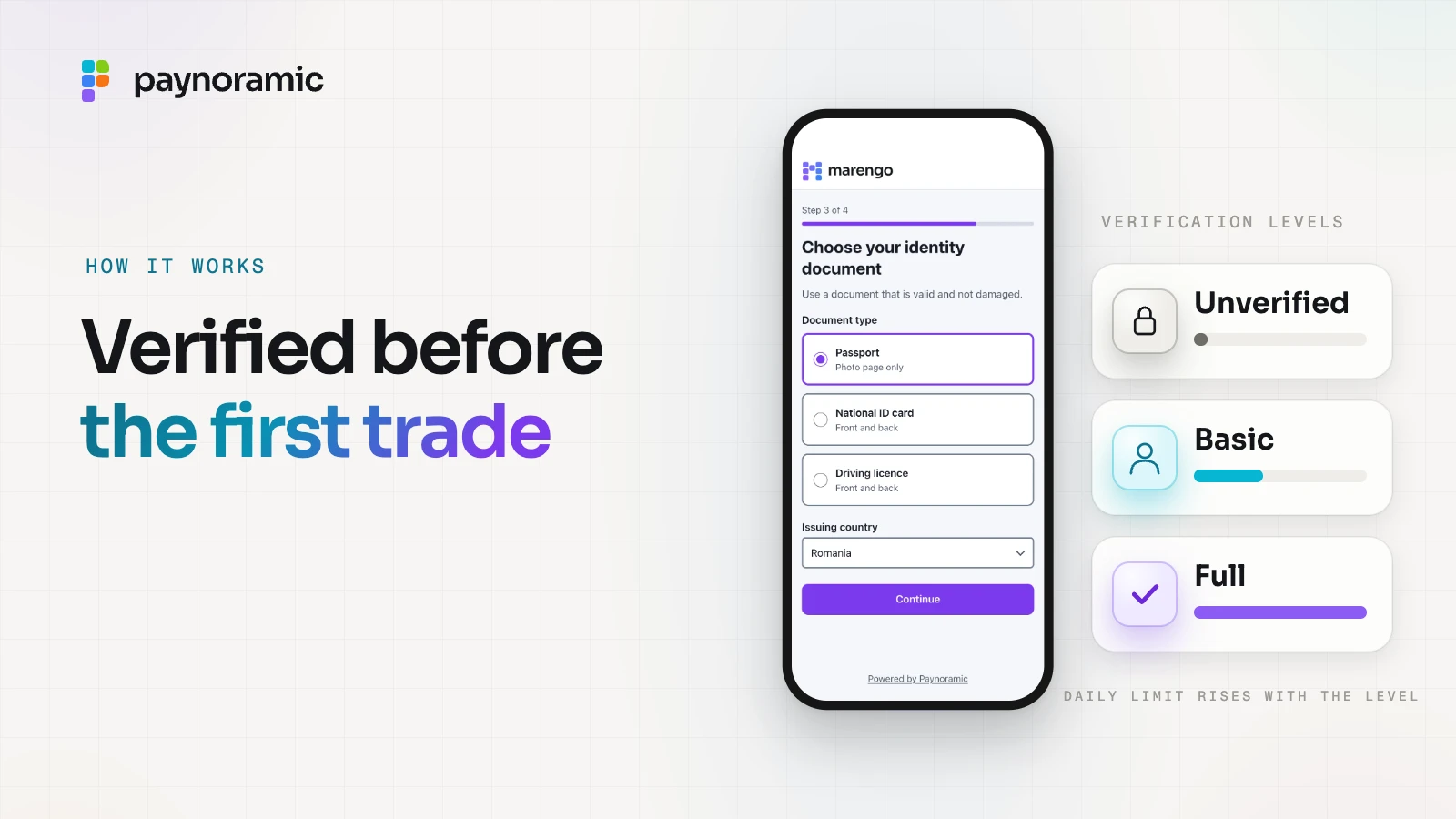
The document. The type and the issuing country: a passport (the photo page), a national ID card or a driving licence (front and back).
The capture. A photo of the document, taken with the phone's camera on the page or uploaded as a file.
The selfie. A photo of the user's face, taken there and then.
Submit. The application goes to checking, and the account shows that it is in review.
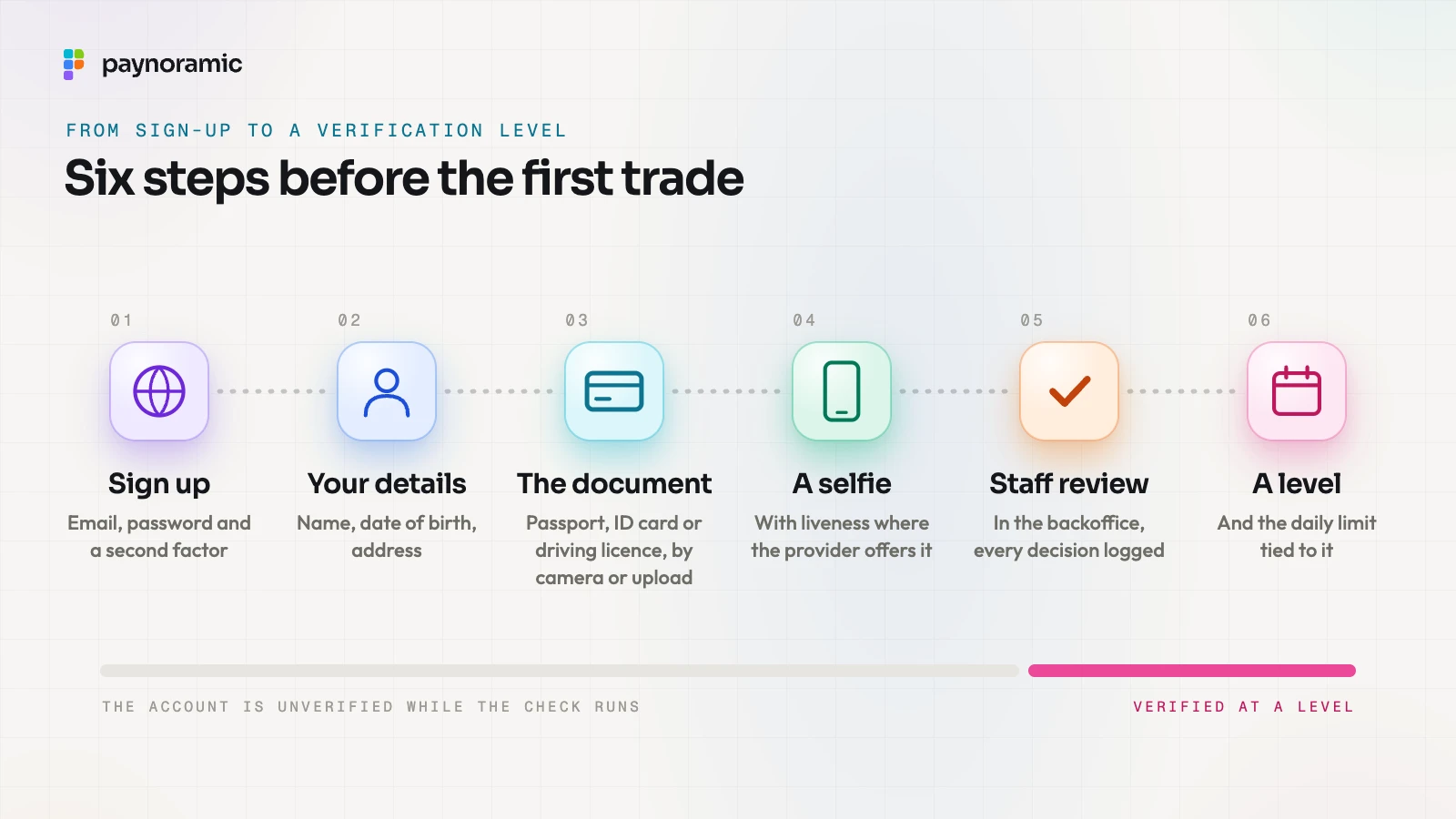
You can see this in Marengo, our exchange: users verify through Paynoramic KYC on a hosted page, with personal details, an identity document and a selfie, by camera or upload, and staff review it in the backoffice.
Liveness and the face match
A selfie on its own proves little: it could be a photo of a photo, or a picture on another screen. Many verification providers therefore add two automated checks.
Liveness. The page asks the user to move, turn or follow a prompt, or analyses the image for signs of a screen or a print, to confirm that a live person is in front of the camera.
Face match. Software compares the face in the selfie with the photo on the document and gives a similarity score.
Providers often add document checks as well: reading the machine-readable lines of a passport, checking that the document has not expired, and looking for signs of editing. Clear results can pass on their own; anything uncertain goes to a person. In the exchange software Paynoramic hands over, identity checks run on Paynoramic KYC, and a client's launch can add Sumsub, Onfido or Veriff instead, each behind its own adapter in the KYC and AML module.
Staff review in the backoffice
Every application that needs a human look lands in a review queue in the exchange's backoffice. A reviewer opens it and sees the details the user typed, the document images, the selfie and any automated results side by side.
The reviewer checks that the three agree: the name and date of birth match the document, the document looks genuine and in date, and the face in the selfie is the face on the document. Then they decide.
Every view and every decision is recorded with the reviewer and the time, so a later question ("who approved this account, and on what?") has an answer. Document images and selfies are among the most sensitive personal data an exchange holds, which is why access to them is limited to reviewers and logged.
When a check fails or needs a second look
A review ends in one of three ways.
Approved. The account moves to the level it applied for, and its new limits apply straight away.
Resubmission requested. Something is fixable: a blurred or cut-off photo, glare over the details, an expired document, or a typed name that does not match the document. The user is told what to fix and goes back to that step only, not to the start.
Rejected. The document looks altered, the face does not match, or the application falls outside the operator's policy, such as a country it does not serve. The reason is recorded for the operator; how much of it the user is told is the operator's choice, because explaining exactly why a forgery failed teaches the next attempt.
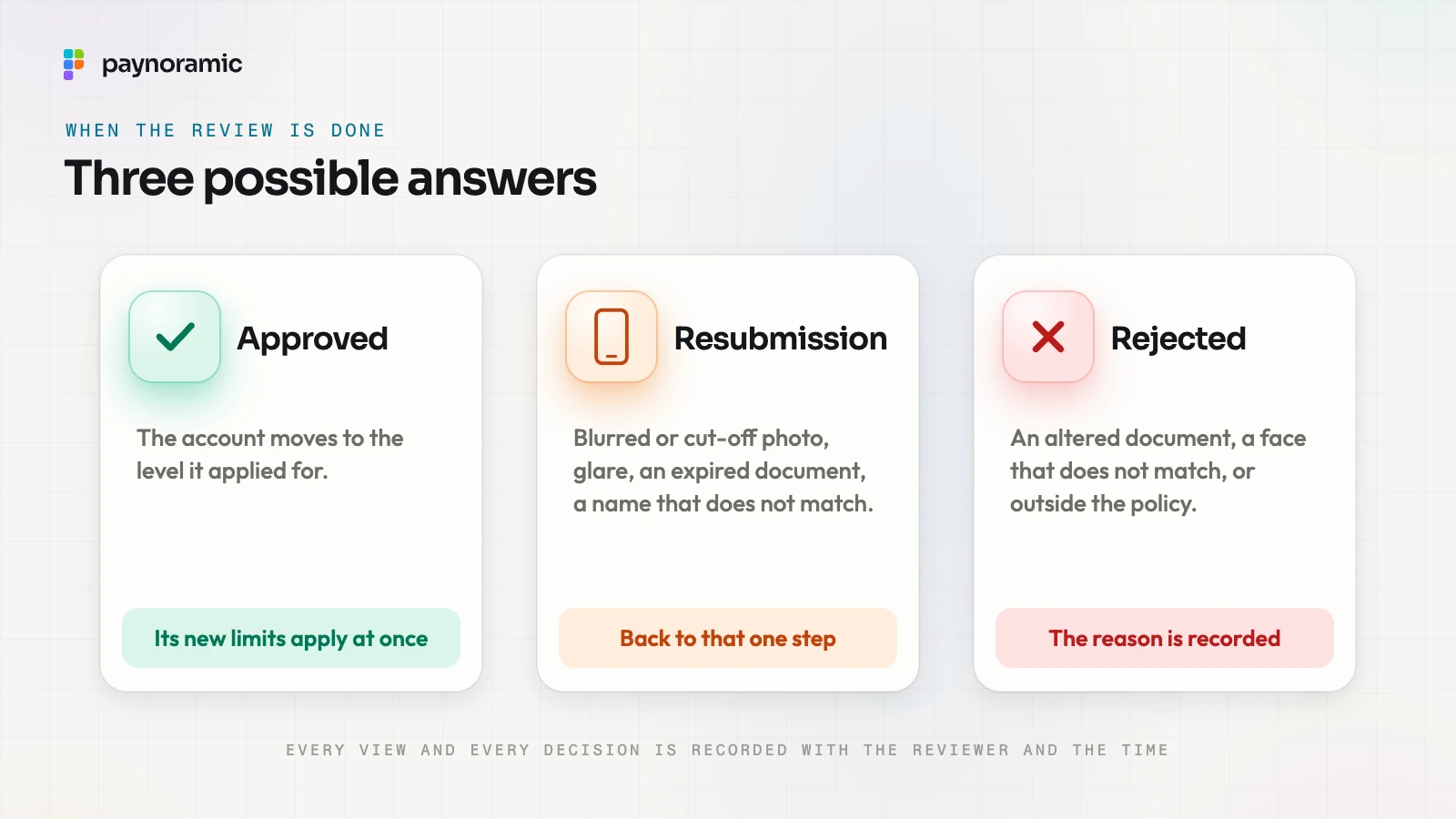
While an application waits, the account shows that it is in review, and the user is notified when it is decided. Most of the friction users feel here comes from photos, which is why good verification pages check sharpness and framing before they accept a capture.
Verification levels and the limits tied to them
A verification level is a tier of trust. Each level names what the user has provided and what the account may do, and the higher levels ask for more and allow more. A typical set looks like this, with the amounts purely as an example:
Level | What it asks for | Daily withdrawal limit (illustrative) |
|---|---|---|
Unverified | Email and password | None: no withdrawals |
Basic | Details, an identity document, a selfie | 2,000 USDT |
Full | Basic, plus proof of address and source of funds | 50,000 USDT |
Who sets these numbers matters. Paynoramic holds no licence and does not operate exchanges: the client is the licensed operator, and it chooses its levels and limits from its own risk assessment and its regulator's expectations. What a licence requires is covered in KYC, AML and the Travel Rule.
The limit is checked each time money leaves. The exchange adds up what the account has already withdrawn in the current day, valued in one reference currency so that different coins can be added together, adds the new request, and compares the total with the level's limit.
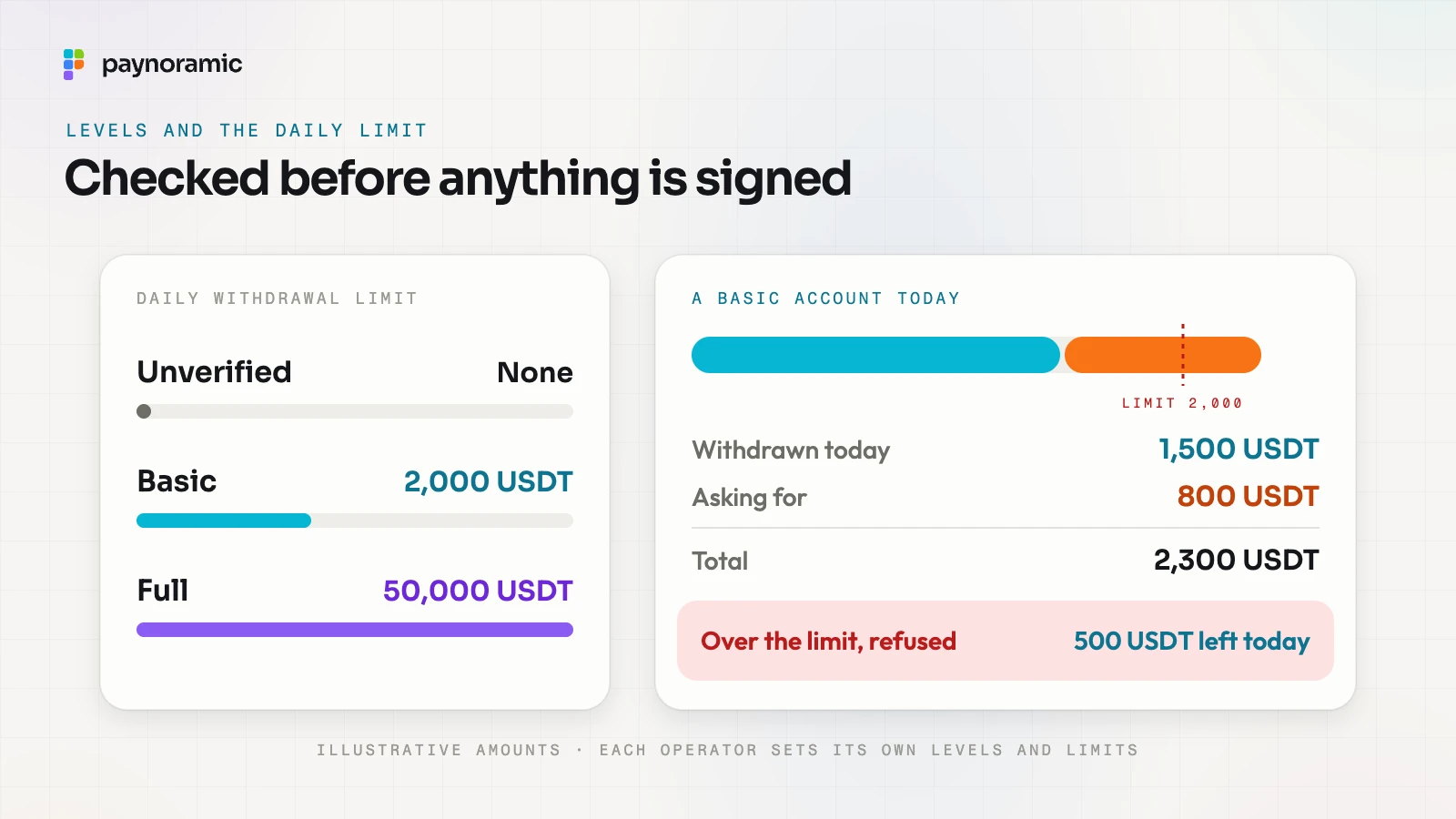
A worked example with the illustrative numbers above:
A Basic account has a daily limit of 2,000 USDT.
It has already withdrawn 1,500 USDT today.
It asks to withdraw another 800 USDT. That would make 2,300, over the limit.
The request is refused before anything is signed, and the app shows that 500 USDT is left today.
The limit is one of several checks a withdrawal passes, set out in how a crypto withdrawal reaches the right wallet. In Marengo, withdrawals pass approval rules and daily limits set by verification level.
Moving up a level
A user who reaches their limit can apply for the next level. The app shows what that level adds, for example proof of address or a short questionnaire about the source of funds, and asks only for the new steps: the document and selfie already approved stay on file.
The new items go through the same review. Once they are approved, the account's level changes and the higher limit applies at once, with no new account and no new sign-up.
Levels can also go down. A document that expires, details that change, or a later review that finds a problem can move an account back a level or pause it until the user updates their file. Watching activity after onboarding is a separate job, transaction monitoring, which sits alongside the levels rather than inside them.
Frequently asked questions
Can an unverified account deposit or trade? It depends on the operator. Many let an unverified account look around and start the check, and keep deposits, trading and withdrawals for verified levels.
How long does verification take? Automated checks return in moments. A manual review takes as long as the queue: the more an operator automates with confident results, the fewer applications wait for a person.
Why is a selfie needed if the document has a photo? The document proves that a person exists; the selfie, with a liveness check, proves that the person applying is that person and is present.
Are levels and limits the same on every exchange? No. Each operator sets its own, from its risk assessment and its licence, and can change them over time.
See it working
The path from sign-up to a verified account is easiest to understand on a real one. Open Marengo at marengo.paynoramic.com to go through the identity check yourself, or read about the white-label crypto exchange to see what is handed over, the review in the backoffice included.